

Table of Contents
With the increasing prevalence of remote work, online education, and virtual gatherings, video conferencing platforms like Zoom have become essential tools for communication and collaboration. While built-in microphones on laptops and webcams suffice for basic audio needs, they often fall short in capturing clear, natural, and professional-quality sound. This is where wireless microphones come into play, offering enhanced audio clarity, mobility, and versatility for Zoom meetings. In this comprehensive guide, we’ll explore the benefits of using wireless microphones for Zoom meetings, how to choose the right microphone, setup tips, and best practices for maximizing audio quality and engagement.
The Benefits of Wireless Microphones for Zoom Meetings:

- Improved Audio Quality: Wireless microphones capture clearer, more natural sound compared to built-in laptop or webcam microphones, resulting in better communication and comprehension during Zoom meetings.
- Enhanced Mobility: With wireless microphones, presenters and participants have the freedom to move around, gesture, and engage naturally without being tethered to their devices, leading to more dynamic and interactive meetings.
- Reduced Background Noise: Wireless microphones offer better noise isolation and directional pickup, minimizing background noise and distractions, thereby improving focus and concentration during Zoom calls.
- Professional Appearance: Using wireless microphones adds a touch of professionalism to your Zoom meetings, signaling to participants that you prioritize audio quality and attention to detail.
- Versatility: Wireless microphones come in various types and configurations, including lapel/lavalier microphones, headset microphones, handheld microphones, and clip-on microphones, allowing you to choose the most suitable option for your meeting format and preferences.
Choosing the Right Wireless Microphone for Zoom Meetings:
- Lavalier Microphones: Lavalier microphones are discreet, clip-on microphones that can be worn on clothing, making them ideal for hands-free operation during presentations, speeches, or interviews.
- Headset Microphones: Headset microphones feature a headset design with a boom arm microphone, offering excellent sound quality and stability for active presenters or performers.
- Handheld Microphones: Handheld microphones provide a traditional microphone experience, allowing presenters or moderators to hold the microphone while speaking. They are suitable for panel discussions, Q&A sessions, or audience interaction.
- Clip-On Microphones: Clip-on microphones attach directly to the collar or lapel of clothing, offering a balance between convenience and audio quality for casual meetings or remote interviews.
Setting Up Wireless Microphones for Zoom Meetings:

- Check Compatibility: Ensure that your wireless microphone is compatible with your computer, tablet, or smartphone and supports the required connectivity options (e.g., Bluetooth, USB, or wireless receiver).
- Charge or Replace Batteries: If your wireless microphone uses batteries, make sure they are fully charged or replaced before the meeting to avoid interruptions or power failures.
- Connect the Microphone: Follow the manufacturer’s instructions to connect the wireless microphone to your device via the designated connection method (e.g., Bluetooth pairing, USB cable, or wireless receiver).
- Test Audio Levels: Use Zoom’s audio settings or system preferences to select the wireless microphone as the input device and adjust audio levels to ensure optimal sound quality and volume.
- Position the Microphone: Properly position the wireless microphone to achieve the best sound quality and minimize interference or feedback. Experiment with microphone placement and orientation to find the optimal configuration for your meeting setup.
Best Practices for Using Wireless Microphones in Zoom Meetings:
- Minimize Background Noise: Choose a quiet, well-lit location for your Zoom meetings and minimize background noise, distractions, and interruptions to ensure clear and focused communication.
- Speak Clearly and Concisely: Encourage participants to speak clearly, enunciate their words, and avoid talking over each other to maintain audio clarity and comprehension.
- Use Mute Functionality: Remind participants to mute their microphones when not speaking to prevent background noise, echo, or feedback from disrupting the meeting.
- Monitor Audio Levels: Keep an eye on audio levels and adjust microphone sensitivity or volume as needed to prevent clipping, distortion, or excessive loudness.
- Engage with Participants: Encourage active participation, feedback, and interaction from all participants to create a dynamic and engaging meeting environment.
Troubleshooting Common Issues with Wireless Microphones in Zoom Meetings:
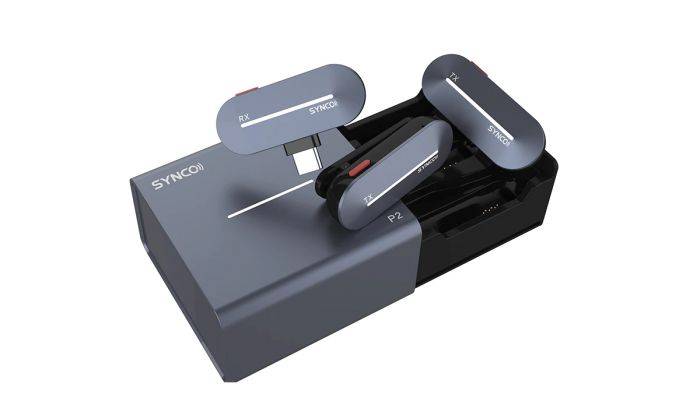
- Interference or Dropouts: If experiencing interference or dropouts, try moving closer to the wireless receiver or adjusting the antenna position to improve signal strength and stability.
- Battery Life: Monitor battery life and keep spare batteries or a charging cable on hand to ensure uninterrupted operation during extended meetings or presentations.
- Audio Latency: If encountering audio latency or delay, check for software updates, adjust audio settings, or try using a different connection method (e.g., wired connection) to minimize latency.
- Compatibility Issues: Ensure that your wireless microphone is compatible with your device’s operating system and Zoom software version to avoid compatibility issues or connectivity problems.
Related Post:
Unveiling the Supercardioid Microphone: A Comprehensive Guide
Explorando el Mundo del Micrófono Hipercardioide: Características, Aplicaciones y Mejores Usos
Unlocking the Potential of External Microphones for iPhone: A Comprehensive Guide
Wireless microphones offer a convenient, flexible, and effective solution for enhancing audio quality and engagement in Zoom meetings. By choosing the right wireless microphone for your meeting format, setting up correctly, and following best practices for optimal performance, you can elevate the audio experience for yourself and your participants. Whether you’re hosting virtual meetings, webinars, training sessions, or online events, wireless microphones empower you to communicate with clarity, confidence, and professionalism in the digital realm.