


Table of Contents
Condenser microphones are prized for their sensitivity, clarity, and versatility, making them a favorite choice among audio professionals, musicians, podcasters, and content creators. However, harnessing the full potential of a condenser microphone requires understanding its unique characteristics and mastering the techniques for optimal use. In this comprehensive guide, we’ll delve into the intricacies of using condenser microphones, covering everything from setup and positioning to best practices for achieving professional-grade audio recordings.
Understanding Condenser Microphones:
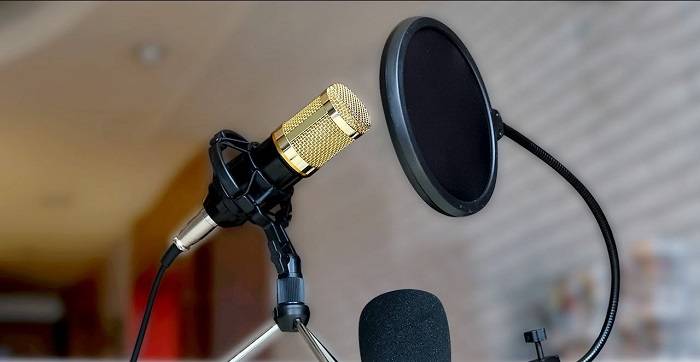
Condenser microphones, also known as capacitor microphones, operate on the principle of electrostatics to convert sound waves into electrical signals. They consist of a diaphragm and a backplate separated by a small air gap, forming a capacitor. When sound waves hit the diaphragm, it vibrates, causing changes in the capacitance between the diaphragm and backplate, thus generating an electrical signal. Condenser microphones are known for their high sensitivity, accuracy, and wide frequency response, making them suitable for capturing vocals, acoustic instruments, and studio recordings with exceptional clarity and fidelity.
Setting Up a Condenser Microphone:
- Connectivity: Condenser microphones typically require external power to operate their internal electronics and charge the capacitor. They can be connected to audio interfaces, mixers, or preamps via XLR cables, or directly to computers or recording devices via USB cables.
- Phantom Power: Many condenser microphones require phantom power (typically 48 volts) to function. Ensure that your audio interface or mixer provides phantom power and enable it before connecting the microphone.
- Mounting: Use a shock mount or microphone stand to mount the condenser microphone securely and isolate it from vibrations and handling noise. Position the microphone at the appropriate height and angle for optimal sound capture.
- Pop Filter: Attach a pop filter or windscreen to the microphone to minimize plosive sounds (such as “p” and “b” sounds) and reduce wind noise during vocal recordings.
- Room Acoustics: Consider the acoustics of your recording environment and use acoustic treatment, such as foam panels or blankets, to minimize reflections, echoes, and background noise.
Techniques for Using Condenser Microphones:

- Proximity Effect: Take advantage of the proximity effect, which enhances bass frequencies when the microphone is positioned close to the sound source. Experiment with microphone placement to achieve the desired tonal balance and warmth.
- Polar Patterns: Understand the microphone’s polar pattern (omnidirectional, cardioid, figure-8, etc.) and use it to your advantage for capturing sound from specific directions while minimizing off-axis noise and interference.
- Mic Placement: Experiment with microphone placement and orientation to capture the desired sound source accurately. Position the microphone slightly off-axis to reduce sibilance and harshness in vocal recordings.
- Gain Staging: Set appropriate input levels on your audio interface or mixer to prevent clipping and distortion while maximizing signal-to-noise ratio. Adjust microphone gain to achieve optimal recording levels without overloading the preamp.
- Monitoring: Use headphones or studio monitors to monitor audio quality in real-time while recording. Check for clipping, distortion, background noise, and other artifacts and make adjustments as needed.
Best Practices for Recording with Condenser Microphones:
- Room Selection: Choose a quiet, well-treated room for recording to minimize background noise, echoes, and reverberation. Consider using a vocal booth or acoustic treatment to create a controlled recording environment.
- Performance Preparation: Prepare the performer or speaker for the recording session by providing guidance on microphone technique, breathing control, and vocal delivery. Encourage them to relax and focus on their performance for optimal results.
- Multiple Takes: Record multiple takes of the performance to capture different nuances, dynamics, and interpretations. This allows for flexibility during the editing and mixing process and ensures that you have options to choose from.
- Post-Processing: Use audio editing software to clean up recordings, remove background noise, adjust levels, and apply EQ, compression, and other effects to enhance the sound quality and clarity.
- Backup and Storage: Backup your recordings regularly and store them securely to prevent data loss or corruption. Use cloud storage, external hard drives, or dedicated backup solutions to ensure redundancy and reliability.
Troubleshooting Common Issues with Condenser Microphones:

- Low Output Level: Check the microphone cable, connectors, and audio interface settings for loose connections or incorrect settings. Increase microphone gain or input level on the preamp to boost the output signal.
- Excessive Noise: Identify and eliminate sources of noise, such as air conditioning, computer fans, and electrical interference, in your recording environment. Use noise reduction plugins or software tools to clean up noisy recordings during post-processing.
- Plosive Sounds: Use a pop filter or windscreen to minimize plosive sounds and reduce wind noise during vocal recordings. Encourage performers to use proper microphone technique and control their breathing to avoid excessive breathiness and pops.
- Sibilance: Address sibilance issues by adjusting microphone placement, using a de-esser plugin, or applying EQ to reduce harshness in vocal recordings. Experiment with different microphone angles and distances to find the optimal setup for minimizing sibilance.
- Room Acoustics: Improve room acoustics by adding acoustic treatment, such as bass traps, diffusers, and absorbers, to minimize reflections, echoes, and resonances. Experiment with microphone placement and orientation to find the optimal position for capturing clean, natural sound.
Related Post:
Unraveling the Mystery of Muffled Earphone Sounds: Causes and Solutions
The Data Behind Podcasting: Unveiling the Hidden Insights
Condenser microphones offer unparalleled sensitivity, clarity, and versatility for a wide range of recording applications, from vocals and instruments to podcasts, voiceovers, and studio productions. By mastering the techniques for using condenser microphones effectively, understanding their unique characteristics, and following best practices for recording and post-processing, you can achieve professional-grade audio recordings with exceptional clarity, detail, and fidelity. Whether you’re a musician, podcaster, voice actor, or content creator, condenser microphones empower you to capture and create captivating audio content that engages and inspires your audience.