


Table of Contents
A great microphone is indispensable for creating top-notch audio content. However, owning a high-quality mic is just the beginning. Achieving exceptional sound quality involves understanding various techniques and utilizing tools to optimize your microphone’s performance. Whether you’re a podcaster, musician, content creator, or professional presenter, the quest to enhance microphone sound is universal.
In this extensive guide, we’ll delve deep into methods, tips, and tools that will elevate your microphone’s sound quality, ensuring your recordings are crisp, clear, and professional. From fundamental adjustments to advanced techniques, here’s everything you need to know to make your microphone sound better.
Understanding Microphone Types and Their Impact on Sound Quality

Microphones play a pivotal role in capturing audio, and their diverse types cater to a wide range of recording scenarios. Let’s delve deeper into the distinct characteristics of condenser, dynamic, ribbon, and other microphone types, shedding light on their unique features and applications.
Condenser Microphones:
-
- Condenser microphones are known for their sensitivity and wide frequency response. They excel in capturing subtle nuances and are often preferred for studio recording of vocals, acoustic instruments, and intricate sound sources.
- The diaphragm in condenser mics is lighter, allowing for faster response to changes in sound pressure. This results in a detailed and transparent sound reproduction, making them ideal for capturing the intricacies of voice and acoustic instruments.
Dynamic Microphones:
-
- Dynamic microphones are robust and can handle high sound pressure levels, making them suitable for live performances and recording loud sound sources such as guitar amplifiers and drums.
- Due to their durability and ability to reject ambient noise, dynamic mics are commonly used on stage. They are also favored for close-miking applications, providing a focused sound capture without picking up unwanted background noise.
Ribbon Microphones:
-
- Ribbon microphones are known for their warm and natural sound. They operate on electromagnetic induction and are often chosen for capturing the vintage tonality of certain instruments like brass, strings, and guitar cabinets.
- However, ribbon mics are more delicate compared to other types and are sensitive to strong winds or high sound pressure levels. Careful handling is crucial to maintain their longevity and performance.
Shotgun Microphones:
-
- Shotgun microphones are highly directional and excel at capturing sound from a specific direction while minimizing noise from the surroundings. They are commonly used in film and television production for capturing dialogue in challenging outdoor environments.
- Their extended reach and focused pickup pattern make shotgun mics indispensable tools for location recording, interviews, and other scenarios where pinpointing audio sources is essential.
USB Microphones:
-
- USB microphones are convenient solutions for home studios and podcasting. They have a built-in analog-to-digital converter, eliminating the need for external audio interfaces. USB mics are plug-and-play, making them user-friendly for beginners.
- While they may not always match the audio quality of professional studio microphones, USB mics offer a practical and cost-effective option for content creators and musicians working in less demanding environments.
Understanding the nuances of these microphone types empowers audio professionals and enthusiasts to make informed decisions based on the specific requirements of their projects. Whether recording vocals, instruments, or ambient sounds, choosing the right microphone type enhances the overall sound quality and ensures a successful audio production.
Proper Placement and Mic Positioning Techniques

When it comes to optimizing sound quality, understanding the ideal microphone positions for different scenarios is crucial. Let’s delve deeper into various situations to provide comprehensive guidance for achieving optimal audio recording and broadcasting results.
Vocal Recording:
-
- For studio vocal recording, a popular technique is the use of a cardioid microphone positioned at a slight angle, about 6-12 inches away from the vocalist. This helps capture a balanced mix of the singer’s voice while minimizing unwanted background noise.
- Experiment with pop filters to reduce plosive sounds and maintain consistent distance from the microphone to ensure a steady and even recording.
Instrument Capturing:
-
- Different instruments require specific microphone placements. For acoustic guitars or pianos, a pair of small-diaphragm condenser microphones in an X-Y or spaced pair configuration can capture a natural stereo image.
- For electric guitars, positioning a dynamic microphone close to the speaker cone and experimenting with angles can help achieve the desired tonal characteristics.
Live Streaming and Podcasting:
-
- In live streaming setups, a cardioid or shotgun microphone is often preferred to minimize ambient noise and focus on the speaker’s voice.
- Proper microphone positioning for podcasting involves maintaining a consistent distance and angle to ensure a consistent audio level throughout the recording.
Video Conferencing:
-
- When using microphones for video conferencing, a headset or lavalier microphone can provide clear and consistent audio quality. Make sure to position the microphone close to your mouth for optimal results.
Field Recording:
-
- For capturing environmental sounds or interviews outdoors, a directional microphone with a windscreen is essential to minimize wind noise. Experiment with the microphone’s angle and position to achieve the best balance between the subject and background sounds.
Drum Miking:
-
- Drum kits require a combination of microphones to capture different elements. Close-miking individual drums with dynamic microphones and adding overhead condenser microphones can provide a well-balanced drum sound.
Room Acoustics:
-
- Consider the acoustic properties of the recording space. Experiment with microphone placement to find the sweet spot that minimizes room reflections and maximizes the clarity of the recorded audio.
Room Acoustics and Noise Reduction Strategies

Creating an optimal recording environment is essential for achieving high-quality audio output. Room acoustics, echo reduction, and noise cancellation techniques play crucial roles in ensuring that your recordings are clear, crisp, and free from unwanted disturbances.
Room Acoustics: Understanding and managing the acoustics of your recording space is fundamental. The physical characteristics of a room, such as its size, shape, and construction materials, can significantly impact how sound behaves within it. To optimize room acoustics, consider adding acoustic treatments like bass traps, diffusers, and absorptive panels. These elements help control sound reflections and minimize undesirable reverberations, ultimately enhancing the clarity of your recordings.
Echo Reduction: Echoes, caused by sound waves bouncing off surfaces, can degrade the quality of your audio recordings. To reduce echoes, strategically place acoustic panels on walls and ceilings, especially in areas where sound reflection is prominent. Additionally, using furniture or other objects in the room can help break up sound waves and minimize echo. Experiment with the placement of your recording equipment and adjust the room layout to find the optimal configuration for echo reduction.
Noise Cancellation Techniques: Unwanted background noise can be a significant challenge in recording environments. Employing noise cancellation techniques is crucial to eliminate or minimize external disturbances. Invest in quality microphones with effective noise-canceling capabilities, and consider using pop filters to reduce plosive sounds. Utilize noise gates during post-production to eliminate low-level background noise when no audio signal is present. Additionally, recording during times of minimal external activity, such as late at night or early in the morning, can help reduce ambient noise.
Isolation: Isolating your recording space from external sounds is another key aspect of achieving high-quality audio. Ensure that doors and windows are sealed properly to prevent external noise from entering your recording space. If possible, create a dedicated recording room or booth that is insulated against both external and internal sounds. This isolation helps maintain a controlled and focused recording environment.
Digital Signal Processing (DSP): In the digital realm, leverage advanced digital signal processing tools to further enhance your recordings. Apply noise reduction algorithms during post-production to eliminate background noise without compromising the integrity of your primary audio. Experiment with equalization to balance frequencies and ensure a natural and pleasing sound.
Selecting the Right Accessories for Improved Sound
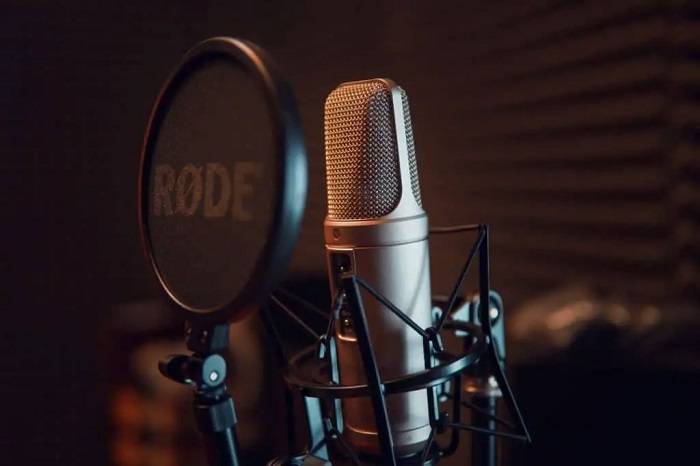
When considering accessories to enhance microphone performance, it’s essential to understand the specific functions of each item and how they contribute to achieving optimal sound quality. Let’s delve into each accessory and explore additional information on their importance and usage:
Pop Filters:
-
- Function: Pop filters are designed to minimize plosive sounds, such as the ‘p’ and ‘b’ sounds, by diffusing the force of the air hitting the microphone diaphragm.
- Importance: They help prevent distortion and unwanted noise caused by air blasts, ensuring cleaner recordings.
- Usage: Proper placement of the pop filter is crucial. It is typically positioned between the microphone and the sound source, about two inches away from the microphone diaphragm.
Shock Mounts:
-
- Function: Shock mounts isolate the microphone from vibrations and handling noise, preventing these disturbances from reaching the microphone.
- Importance: They are particularly useful in studio environments where vibrations from footsteps or equipment can affect recording quality.
- Usage: Attach the shock mount to a microphone stand, and then secure the microphone within the mount. This helps to absorb and dampen vibrations effectively.
Windscreens:
-
- Function: Windscreens, also known as foam or windshields, protect the microphone from wind noise and breath sounds.
- Importance: They are essential for outdoor recordings or in environments with air circulation, preventing unwanted interference.
- Usage: Slip the windscreen over the microphone, ensuring a snug fit. It’s especially crucial for handheld microphones used in outdoor settings.
Isolation Shields:
-
- Function: Isolation shields, also called reflection filters, reduce room reflections and ambient noise, providing a more controlled recording environment.
- Importance: They are valuable in home studios or untreated spaces where sound reflections can degrade recording quality.
- Usage: Mount the isolation shield behind the microphone to capture the sound directly while minimizing reflections. Some shields are portable and foldable for convenience.
Microphone Stands:
-
- Function: Sturdy microphone stands provide stability and flexibility in positioning the microphone for optimal sound capture.
- Importance: A stable stand reduces the risk of vibrations and ensures consistent microphone placement.
- Usage: Choose a stand with adjustable height and arm length to accommodate various recording setups. Boom arms are particularly useful for versatile microphone positioning.
Cables and Connectors:
-
- Function: High-quality cables and connectors are essential for maintaining signal integrity and preventing interference.
- Importance: Choosing the right cables and connectors helps preserve the fidelity of your recordings.
- Usage: Invest in balanced cables to minimize interference and ensure a secure connection between the microphone and recording equipment.
Equalization (EQ) and Audio Processing Techniques

Understanding and mastering EQ settings is a fundamental aspect of audio engineering that can significantly enhance the overall quality of your recordings. EQ, or equalization, allows you to control the balance between different frequencies in your audio, enabling you to fine-tune and sculpt the tonal characteristics of your recordings.
When diving into EQ settings, it’s essential to grasp the concept of frequency bands. Each band represents a range of frequencies, such as bass, midrange, and treble. Adjusting these bands enables you to address issues like muddiness, harshness, or lack of warmth in your recordings. Experimenting with EQ settings during both recording and mixing phases empowers you to tailor the sound to your preferences or the requirements of the project.
Moreover, understanding the role of audio processing tools is crucial for achieving professional-sounding recordings. Compression, for instance, is a powerful tool that helps control the dynamic range of your audio. By reducing the difference between the loudest and softest parts of your recording, compression ensures a more consistent and polished sound. It’s particularly useful for vocals, drums, and other dynamic elements in your mix.
Reverb and delay are additional audio processing tools that can add depth and spatial characteristics to your recordings. These effects simulate the natural acoustics of different environments, providing a sense of space and dimensionality. Careful application of reverb and delay can contribute to a more immersive and professional-sounding mix.
Furthermore, mastering the art of EQ and audio processing involves recognizing when to use these tools subtly and when to apply more drastic adjustments. Over-EQing or excessive use of processing can lead to unnatural and undesirable artifacts in your recordings. Striking the right balance requires a combination of technical knowledge and a keen ear for musicality.
In addition to EQ, compression, reverb, and delay, there are various other audio processing techniques worth exploring. De-essing, for instance, targets and reduces harsh sibilant sounds in vocal recordings. Saturation and harmonic distortion can be applied to introduce warmth and character to digital recordings, emulating the pleasing imperfections of analog equipment.
As you delve into the world of audio processing, it’s important to consider the context of your recordings. Different genres and styles may call for distinct approaches to EQ and processing. Developing your skills in this area involves both technical knowledge and artistic intuition, honed through practice and attentive listening.
Tips for Maintaining and Cleaning Your Microphone
Regular Cleaning Routine: Regularly cleaning your microphone is crucial for preventing the buildup of dust, dirt, and grime. Use a soft, lint-free cloth to gently wipe down the exterior of the microphone, ensuring that no particles accumulate on the surface. Be cautious around sensitive areas such as the diaphragm and connectors.
Pop Filter Usage: Invest in a quality pop filter to shield your microphone from plosive sounds (like “p” and “b” sounds). This not only improves the quality of your recordings but also acts as a protective barrier, minimizing the chances of moisture and debris reaching the microphone diaphragm.
Storage and Transportation: Proper storage and transportation are often overlooked aspects of microphone care. When not in use, store your microphone in a protective case to shield it from environmental elements. When transporting your microphone, make sure it’s securely packed to prevent any physical damage during transit.
Windscreen Protection: If you often record in outdoor or windy environments, consider using a windscreen. This accessory helps reduce wind noise and protects the microphone from airborne particles. Ensure your windscreen is clean and free of debris to maintain optimal performance.
Safe Cable Handling: Treat the microphone cable with care. Avoid bending it excessively or pulling it forcefully from the connectors. Regularly check for any signs of wear or damage and replace the cable if necessary. Proper cable management contributes significantly to the overall longevity of your microphone setup.
Environment Considerations: Be mindful of the environment in which you use your microphone. Avoid exposing it to extreme temperatures, humidity, or direct sunlight. Such conditions can damage the internal components and affect the microphone’s performance over time.
Avoiding Physical Shock: Handle your microphone with care to prevent any physical shocks or drops. Even minor impacts can have a detrimental effect on the delicate internal components. If your microphone does experience a significant impact, it’s advisable to have it inspected by a professional.
Regular Inspection: Conduct periodic inspections of your microphone to check for any signs of wear, loose connections, or damage. If you notice anything unusual, address the issue promptly or seek professional assistance. Early detection and intervention can prevent minor problems from escalating into major issues.
Proper Powering: Ensure that you are providing the correct power to your microphone, especially if it requires phantom power. Using the wrong power source can damage the microphone’s internal circuitry. Refer to the manufacturer’s guidelines for the recommended power specifications.
Manufacturer Guidelines: Always follow the manufacturer’s guidelines and recommendations for maintenance and cleaning. Each microphone model may have specific requirements, and adhering to these guidelines will help you maximize the lifespan and performance of your microphone.
Utilizing Software and Plugins for Sound Enhancement

Delve into the intricate realm of audio engineering as we uncover an array of cutting-edge software and plugins meticulously crafted to elevate the quality of microphone sound. Whether you’re a seasoned recording artist, podcaster, or content creator, optimizing your audio setup can significantly impact the final product.
One standout tool in the world of microphone enhancement is digital audio workstation (DAW) software. DAWs such as Pro Tools, Ableton Live, and Logic Pro provide a versatile platform for recording, editing, and processing audio. These programs often come equipped with a plethora of built-in plugins and effects that can be applied to enhance the clarity, warmth, and overall character of your microphone recordings. From equalization (EQ) to compression and reverb, these features allow you to sculpt your sound to perfection.
For those seeking specialized enhancements, dedicated microphone plugins have gained popularity. Manufacturers like Waves, iZotope, and Antares offer plugins designed specifically for mic optimization. These plugins can address common issues like background noise, plosives, and sibilance, providing real-time solutions to enhance the overall audio quality during recording.
Additionally, the world of virtual instruments and synthesizers extends its influence to microphone enhancement. By integrating virtual instruments into your recording setup, you can enrich your sound with a vast array of sampled instruments and synthesized elements. This not only adds depth to your recordings but also allows for creative sound manipulation to achieve unique and captivating results.
The utilization of hardware and software preamps is another avenue worth exploring. Preamps, whether physical or digital, can amplify the weak microphone signal, improving signal-to-noise ratio and adding a touch of color to the sound. Many modern audio interfaces come equipped with high-quality preamps, while standalone preamp units offer even greater control and sonic flexibility.
Moreover, the rise of artificial intelligence (AI) in audio processing has given birth to intelligent noise reduction tools and adaptive processing plugins. These advanced technologies analyze audio in real time, automatically identifying and mitigating unwanted noise or inconsistencies. This allows for cleaner recordings without the need for extensive post-production editing.
To integrate these tools seamlessly into your recording setup, consider investing time in understanding your chosen software or plugin’s user interface and functionality. Experiment with different settings, presets, and combinations to discover the optimal configuration for your specific recording environment and microphone.
In conclusion, the world of software and plugins for microphone enhancement is diverse and continually evolving. By staying abreast of the latest advancements and experimenting with various tools, you can unlock new dimensions of audio quality, ensuring that your recordings stand out with professional polish and sonic brilliance.
DIY Techniques for Improving Microphone Sound
Improving your microphone’s sound quality doesn’t always have to involve splurging on expensive equipment; there are numerous do-it-yourself (DIY) hacks and cost-effective methods that can significantly enhance your audio recording without breaking the bank. Here are some practical tips to help you achieve better sound quality on a budget:
Optimize Your Recording Environment:
-
- Minimize background noise by recording in a quiet space. Consider using blankets or curtains to dampen sound reflections.
- Experiment with different room setups to find the most acoustically favorable configuration.
DIY Pop Filter:
-
- Create a pop filter using a wire hanger and a nylon stocking. This simple yet effective solution helps reduce plosive sounds (like “p” and “b” sounds) that can distort your audio.
Isolation Techniques:
-
- Place your microphone on a shock mount to isolate it from vibrations and handling noise. DIY shock mounts can be made from household items like rubber bands and foam.
Improvise a Reflection Filter:
-
- Construct a makeshift reflection filter using a cardboard box and acoustic foam. This DIY solution can help minimize room reflections and improve overall audio clarity.
Foam Windscreen:
-
- Create a windscreen for your microphone using foam material. This can be particularly useful for outdoor recordings or in situations where wind noise may be a concern.
Proper Mic Placement:
-
- Experiment with the distance and angle of your microphone to find the optimal placement for your voice or the sound source. This can have a significant impact on the clarity of your recordings.
DIY Acoustic Panels:
-
- Build your own acoustic panels using rigid fiberglass insulation and fabric. These panels can be strategically placed to absorb and control sound reflections in your recording space.
Software Enhancements:
-
- Explore free or affordable audio editing software to post-process your recordings. EQ adjustments, noise reduction, and compression can be applied to enhance the overall quality of your audio.
Cable Management:
-
- Keep cables organized and secured to prevent interference and unwanted noise. DIY cable organizers or clips can be fashioned from common household items.
Learn Basic Audio Editing Techniques:
-
- Invest time in learning basic audio editing techniques to clean up your recordings. Removing background noise, normalizing audio levels, and applying compression can make a significant difference.
Troubleshooting Common Microphone Sound Issues

To further enhance your recording quality, it’s crucial to address specific issues that may arise during the recording process. Distortion, background noise, and low volume are common challenges that can compromise the overall audio quality. Let’s delve deeper into each of these issues and explore effective solutions:
Distortion: Distortion occurs when the audio signal becomes too loud and exceeds the maximum capacity of the recording equipment. To minimize distortion, consider the following tips:
-
- Adjust input levels: Ensure that the input levels on your recording device are properly set to avoid overloading the signal.
- Use a pop filter: Attach a pop filter to your microphone to reduce plosive sounds and prevent distortion caused by sudden bursts of air.
Background Noise: Background noise can be a persistent issue, especially in environments with ambient sounds. Here are strategies to mitigate background noise:
-
- Select a quiet recording environment: Choose a location with minimal ambient noise to create a clean recording.
- Use directional microphones: Directional microphones focus on capturing sound from a specific direction, helping to reduce background noise.
- Employ noise reduction tools: Post-production software often includes noise reduction features that can effectively minimize unwanted background sounds.
Low Volume: Low volume recordings can result from improper microphone placement or inadequate input levels. Follow these steps to address low volume issues:
-
- Check microphone placement: Ensure the microphone is positioned correctly, and experiment with different angles and distances to find the optimal setup.
- Adjust input levels: Increase the input levels on your recording device to boost the volume, but be cautious not to introduce distortion.
- Use a preamp: If your microphone signal is consistently low, consider using an external preamplifier to amplify the signal before it reaches your recording device.
Room Acoustics: Pay attention to the acoustics of your recording space, as poor room acoustics can contribute to echo and reverberation. To improve acoustics:
-
- Add acoustic treatment: Use sound-absorbing materials such as acoustic panels, rugs, or curtains to minimize reflections and improve sound quality.
- Experiment with microphone placement: Adjust the position of your microphone to find the sweet spot that minimizes unwanted room reflections.
Equipment Quality: Ensure that your recording equipment, including microphones, cables, and interfaces, is of high quality. Investing in professional-grade equipment can significantly enhance the overall recording experience.
Future Trends and Advancements in Microphone Technology

In the ever-evolving landscape of audio technology, staying ahead of the curve is crucial for enthusiasts, professionals, and businesses alike. The world of microphone technology is no exception, with continuous advancements promising unprecedented sound quality and functionality. To truly appreciate and harness the potential of these developments, it’s essential to delve into some of the key emerging trends shaping the future of microphones.
One notable trend is the integration of artificial intelligence (AI) in microphone design and processing. AI algorithms can analyze audio signals in real time, enhancing noise cancellation, reducing feedback, and even adapting to specific environments. This not only results in cleaner and more accurate sound reproduction but also opens up new possibilities for customization, allowing users to fine-tune their audio experience to suit their preferences.
Furthermore, the rise of beamforming technology is revolutionizing how microphones capture sound. Traditional microphones pick up audio from all directions, including unwanted ambient noise. Beamforming, however, enables microphones to focus on specific sound sources while minimizing interference from other directions. This directional accuracy is particularly beneficial in applications such as video conferencing, live performances, and recording studios.
The advent of nano-scale materials and manufacturing techniques is another game-changer in microphone technology. Miniaturization allows for the creation of smaller and more sensitive microphone components, leading to improved performance and increased versatility. This progress has paved the way for innovative microphone designs, such as wearable and inconspicuous microphones that maintain high audio quality in diverse scenarios.
Wireless connectivity is yet another area witnessing significant advancements. Bluetooth technology and other wireless protocols are becoming increasingly sophisticated, enabling seamless integration between microphones and various devices. This not only enhances convenience but also expands the possibilities for remote recording, live streaming, and collaborative audio projects.
environmental sustainability is emerging as a critical factor in the development of microphone technology. Manufacturers are exploring eco-friendly materials, energy-efficient production processes, and recyclable components to reduce the environmental impact of microphone manufacturing. As consumers become more conscious of their ecological footprint, sustainable microphone options are likely to gain popularity in the market.
Related Posts:
- Why Do Podcasters Wear Headphones: Exploring the Purpose and Importance in Recording Sessions
- Shure MV7 vs SM7B: A Comprehensive Comparison Guide for Podcasters and Streamers
- Unveiling the Shure SM7B: Understanding Phantom Power and its Role in Optimizing Performance
FAQs:
How can I reduce background noise when recording with a microphone?
Using acoustic treatment, positioning the mic correctly, and employing noise reduction software are effective ways to minimize background noise.
What role does mic preamp play in enhancing sound quality?
A quality mic preamp amplifies the microphone’s signal without adding noise, ensuring cleaner recordings with improved clarity.
Is post-processing necessary to improve microphone sound quality?
Post-processing, including EQ adjustments and audio enhancement, can significantly improve sound quality but isn’t always mandatory. It depends on your recording goals.
In the world of audio production, achieving exceptional microphone sound is a blend of technical know-how, proper equipment, and creative adjustments. By understanding microphone types, mastering placement techniques, leveraging accessories, and employing audio processing tools, you can unlock the full potential of your microphone, elevating your recordings to professional levels. Experiment, practice, and combine various techniques to create impeccable sound quality that captivates your audience.