


Table of Contents
In the realm of on-the-go creativity and professional audio recording, your Android device harbors untapped potential. With the right microphone app, you can transform your smartphone into a versatile recording studio, capturing crisp audio for podcasts, music, interviews, lectures, or even high-quality voiceovers.
These apps offer a gamut of features, from enhancing built-in microphones to supporting external ones, elevating your recording experiences to professional standards. Whether you’re an amateur looking to refine your audio skills or a seasoned pro needing portability, this comprehensive guide unveils the top-notch microphone apps for Android devices.
Let’s dive into the world of Android microphone apps, exploring their unique features, functionalities, and compatibility across various Android devices. Discover how these apps can unlock your smartphone’s potential, revolutionizing your audio recording experiences.
Understanding Android Microphone Apps

When delving into the purpose and potential of apps designed to enhance audio recording experiences, it’s crucial to recognize the pivotal role they play in bridging the gap between built-in and external microphones. These applications are instrumental in elevating the overall audio quality of recordings, catering to a diverse range of users, from casual content creators to professional audio engineers.
One primary purpose of these apps is to compensate for the limitations of built-in microphones found on various devices, such as smartphones, tablets, and laptops. Built-in microphones are often constrained by their size and placement, resulting in recordings that may lack clarity, depth, or fidelity. Audio enhancement apps address these shortcomings by implementing advanced algorithms and processing techniques that optimize the captured sound, offering users a vastly improved audio experience.
The potential of these apps extends beyond basic optimization. They often provide users with a suite of tools for fine-tuning various audio parameters, including equalization, noise reduction, and reverb control. This level of customization empowers content creators to tailor their audio recordings to specific requirements, whether it’s for podcasting, vlogging, music production, or professional interviews.
Moreover, these apps serve as a cost-effective solution for those who may not have access to high-end external microphones or recording equipment. By leveraging the capabilities of audio enhancement apps, users can achieve remarkable audio quality without the need for substantial financial investments in additional hardware.
For content creators on the go, these apps facilitate versatility and mobility. They empower users to capture high-quality audio in diverse environments, mitigating the challenges posed by ambient noise, reverberation, or other acoustic disturbances. This adaptability makes them invaluable tools for journalists, field recording enthusiasts, and anyone who requires reliable audio recording capabilities in a variety of settings.
In the realm of professional audio production, these apps can be seamlessly integrated into existing workflows. They complement external microphones by providing an additional layer of post-processing and refinement, allowing for a more nuanced and polished final product. This flexibility makes them indispensable for musicians, sound designers, and audio engineers seeking to optimize their recordings at every stage of the production process.
Top Features to Look For
To further explore the capabilities of audio enhancement apps, it’s essential to highlight specific features that contribute to their effectiveness in improving the overall recording experience. These features cater to a wide range of users, from those looking to reduce background noise in casual recordings to professionals seeking meticulous control over audio parameters.
Noise Reduction: One of the standout features of these apps is their advanced noise reduction algorithms. These algorithms work intelligently to identify and suppress unwanted background noise, ensuring that the recorded audio is clean and free from distracting elements. This is particularly valuable for content creators recording in less-than-ideal environments or situations where ambient noise is a challenge.
EQ Adjustments: Audio enhancement apps often include a comprehensive equalization (EQ) suite, allowing users to finely adjust the frequency response of their recordings. This feature is crucial for tailoring the audio to specific needs, such as emphasizing certain frequencies in a musical recording or optimizing speech clarity in a podcast. With parametric and graphic equalizers, users can achieve a customized audio profile that suits their content.
Real-Time Monitoring: Real-time monitoring is a key feature that provides users with immediate feedback on their recordings. Whether through headphones or built-in device speakers, this feature allows users to listen to their audio as it’s being recorded, making on-the-fly adjustments for optimal results. Real-time monitoring is especially beneficial for live broadcasts, interviews, or situations where instant feedback is essential.
Compatibility with External Microphones: Many audio enhancement apps seamlessly integrate with external microphones, expanding their utility for users who prefer or require higher-end recording equipment. This compatibility ensures that users can leverage the full capabilities of professional-grade microphones while still benefiting from the app’s post-processing and enhancement features. This synergy between app and hardware enhances the overall recording quality and versatility.
Custom Presets and Profiles: To streamline the recording process, these apps often include the ability to save custom presets and profiles. Users can create and store configurations tailored to specific recording scenarios, allowing for quick and efficient adjustments based on the content being captured. This feature is particularly valuable for users who regularly switch between different recording environments or styles.
Advanced Audio Effects: Some apps go beyond basic enhancements and offer a range of advanced audio effects. This may include reverb, compression, and modulation effects, providing users with creative tools to add a professional touch to their recordings. Musicians and audio producers, in particular, find these features invaluable for achieving a studio-quality sound in a portable and convenient setup.
User-Friendly Interface: A user-friendly interface is essential for both beginners and experienced users. Intuitive controls and a visually clear layout make it easy for users to navigate the app’s features and settings. This ensures that users can quickly grasp the functionality of the app and focus on capturing high-quality audio without a steep learning curve.
Best Microphone Apps for Podcasting

In the realm of audio enhancement apps, there is a specialized category designed specifically for podcasters. These apps go beyond traditional audio optimization features and provide a comprehensive suite of tools tailored to the unique needs of podcast production. From streamlined editing processes to seamless hosting and sharing capabilities, these podcast-centric apps offer a one-stop solution for both novice and seasoned podcasters.
Easy Editing Tools: Podcast-centric apps often come equipped with intuitive and user-friendly editing tools. These tools are designed to simplify the editing process, allowing podcasters to effortlessly cut, splice, and arrange audio segments. Some apps even include automated editing features that can remove pauses, filler words, or background noise, streamlining the post-production workflow for creators.
Multi-Track Editing: Recognizing the complexity of podcast recordings, these apps frequently support multi-track editing. This functionality enables podcasters to work with multiple audio tracks simultaneously, accommodating scenarios where multiple hosts, guests, or sound effects need to be seamlessly integrated. The ability to edit and mix multiple tracks enhances the overall production quality of podcasts.
Noise Removal and Voice Enhancement: Going beyond basic noise reduction, podcast-centric apps often include specialized tools for noise removal and voice enhancement. These features are vital for ensuring clear and polished vocal recordings, especially in interviews or group discussions. By isolating and enhancing the podcasters’ voices, these apps contribute to a professional and engaging listening experience.
Integrated Hosting Platforms: To simplify the process of sharing podcasts with a global audience, these apps often integrate with hosting platforms. Creators can upload their episodes directly from the app to popular podcast hosting services, saving time and streamlining the publishing workflow. This seamless integration also ensures that podcasts are readily available on various platforms for listeners to access.
Analytics and Performance Tracking: Understanding the performance of podcast episodes is crucial for creators looking to refine their content and engage with their audience effectively. Many podcast-centric apps offer built-in analytics tools, providing insights into metrics such as listener demographics, download numbers, and listener retention. These analytics empower podcasters to make informed decisions about their content strategy.
Collaboration Features: In scenarios where multiple collaborators are involved in podcast production, collaboration features become essential. Podcast-centric apps often include tools for remote collaboration, allowing hosts, producers, and editors to work together seamlessly, regardless of their geographical locations. This collaborative functionality facilitates efficient teamwork and enhances the overall podcast production process.
Easy Sharing and Distribution: Once a podcast episode is ready for the audience, these apps provide hassle-free sharing and distribution options. Creators can easily share episodes on social media, embed them on websites, or generate shareable links. The convenience of these sharing features ensures that podcasters can maximize the reach of their content across various online platforms.
Monetization Tools: Some advanced podcast-centric apps offer built-in monetization tools, allowing creators to explore revenue streams through sponsorships, ads, or listener contributions. These features contribute to the sustainability of podcasting endeavors by providing creators with the means to generate income from their content.
Music Recording Made Easy

In the realm of audio enhancement apps, there exists a niche category specifically crafted to meet the demands of musicians seeking studio-quality recording, mixing, and mastering capabilities on portable devices. These apps serve as powerful tools for artists, composers, and producers who want to capture, refine, and polish their musical creations with the convenience of a mobile platform.
Studio-Quality Recording: Apps designed for musicians prioritize studio-quality recording, allowing users to capture every nuance of their performances. These applications often support high-resolution audio formats, offer multi-track recording functionality, and provide features like overdubbing and punch-in recording. This ensures that musicians can achieve professional-grade recordings directly from their mobile devices.
Virtual Instruments and Synthesizers: Recognizing the need for a complete musical toolkit, these apps frequently integrate virtual instruments and synthesizers. Musicians can access a diverse range of realistic instrument sounds, from pianos and guitars to orchestral instruments and electronic synths. This feature is particularly valuable for creating complex arrangements and compositions entirely within the app.
Advanced Mixing Capabilities: Beyond basic recording, these apps excel in providing advanced mixing functionalities. Users can manipulate individual tracks, adjust levels, apply equalization, and add a variety of audio effects. The intuitive interface often mirrors professional digital audio workstations (DAWs), allowing musicians to create well-balanced and sonically rich mixes directly from their mobile devices.
Real-Time Audio Processing: Many musician-centric apps support real-time audio processing, enabling users to apply effects and adjustments while playing or recording. This capability is invaluable for artists who seek an immediate and dynamic creative process, allowing them to experiment with different sounds and textures in real-time.
Mastering Tools for Polished Results: To bring out the best in their recordings, musicians can utilize built-in mastering tools within these apps. Mastering features may include dynamic range compression, stereo imaging, and final EQ adjustments to ensure that the finished product is polished and ready for distribution. This functionality allows musicians to achieve a professional sound without the need for extensive post-production.
Collaboration Features: Recognizing the collaborative nature of music creation, some apps cater to musicians working in groups. These features facilitate remote collaboration, allowing band members or collaborators to contribute to a project from different locations. This collaborative functionality enhances the flexibility and efficiency of the music production process.
Export and Integration with External Platforms: Musicians often require seamless integration with external platforms for sharing and distribution. These apps typically support various export formats and can directly upload content to popular music streaming platforms or cloud storage services. This integration ensures that musicians can easily share their work with a global audience.
Performance and Practice Tools: Some musician-centric apps go beyond recording and production, offering features tailored to practice and performance. This may include metronomes, virtual tuners, and playback controls that facilitate rehearsal and preparation for live shows.
Customizable Sound Libraries: Musicians often seek a wide array of sounds and samples to enhance their compositions. These apps may include customizable sound libraries, allowing users to import or create their own samples and instruments, further expanding the sonic palette available within the app.
Interview and Lecture Recording

In the realm of audio enhancement apps, there is a distinct category tailored to individuals capturing interviews, lectures, or conferences. These apps prioritize features that facilitate clear voice recording, efficient organization of content, and often include transcription capabilities. Whether you’re a journalist, student, or professional, these applications offer indispensable tools for capturing, managing, and transcribing spoken content.
Clear Voice Recording: Apps designed for interviews, lectures, or conferences prioritize clear voice recording as a fundamental feature. They often employ advanced audio processing algorithms and settings to enhance voice clarity, suppress background noise, and optimize the overall audio quality. This ensures that the recorded content is crisp, intelligible, and suitable for professional use.
Efficient Organization and File Management: Recognizing the importance of organization, these apps typically come equipped with features for efficient file management. Users can easily categorize recordings, add tags, and create folders to keep track of different interviews, lectures, or conferences. This functionality simplifies the process of locating and managing a large volume of recorded content.
Transcription Capabilities: One of the standout features of these apps is their ability to transcribe spoken content into text. Using advanced speech-to-text technology, they convert recorded audio into written transcripts, saving users significant time and effort in manual transcribing. This is particularly valuable for journalists, researchers, and students who need accurate and searchable written records of spoken interviews or lectures.
Real-Time Transcription and Note-Taking: Some advanced apps offer real-time transcription capabilities, allowing users to see a live transcript as the recording takes place. This feature is beneficial for journalists conducting interviews or attendees capturing key points during conferences. Real-time transcription enhances note-taking efficiency and ensures that critical information is captured accurately.
Speaker Identification and Labeling: To enhance the clarity of transcriptions, these apps often include speaker identification and labeling features. This allows users to attribute spoken content to specific individuals, making it easier to follow conversations or discussions, especially in group settings.
Cloud Integration for Accessibility: Recognizing the importance of accessibility and collaboration, many of these apps provide seamless integration with cloud storage services. This enables users to access their recordings and transcriptions from multiple devices, collaborate with team members, and share content effortlessly.
Editing Tools for Precision: In addition to recording and transcription, these apps may include basic editing tools. Users can trim unnecessary sections, remove pauses, or make corrections to the transcribed text. This ensures that the final content is polished and aligned with the intended message.
Language Support and Accents: Considering the diverse range of interviewees, lecturers, or conference speakers, these apps often support multiple languages and can handle various accents. This inclusivity ensures accurate transcription and broadens the applicability of these apps for users working in international or multilingual settings.
Security Features for Confidential Content: Recognizing the sensitive nature of certain interviews or discussions, some apps incorporate security features such as encryption or password protection. These measures ensure that confidential content is safeguarded and only accessible to authorized users.
External Microphone Compatibility
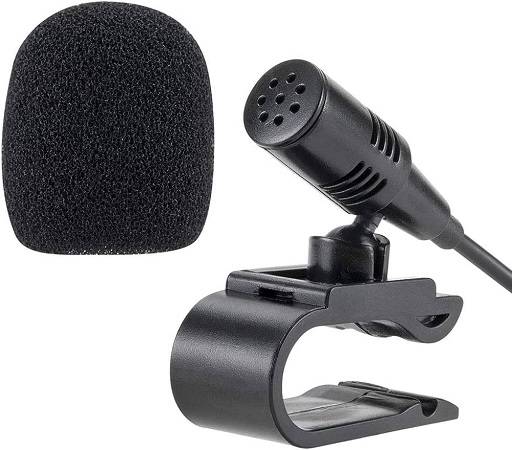
In the landscape of audio enhancement apps, a crucial subset is dedicated to seamlessly integrating with various external microphones, significantly elevating the audio quality of recordings. These apps cater to a diverse range of users, from content creators and musicians to podcasters and journalists, allowing them to harness the full potential of high-quality external microphones for superior sound reproduction.
Wide Compatibility with External Microphones: A key feature of these apps is their compatibility with an extensive range of external microphones. This versatility ensures that users can connect and optimize the performance of professional-grade microphones, including USB, XLR, or lightning-connected mics. This flexibility is particularly important for those who prioritize specific microphone characteristics to capture nuanced audio.
Advanced Gain Control: To fine-tune audio recordings with external microphones, these apps often include advanced gain control features. Users can adjust input levels to optimize signal-to-noise ratios, preventing distortion and ensuring that recordings capture the full dynamic range of the source material. This level of control is especially valuable in various recording environments and conditions.
Real-Time Monitoring with External Microphones: Many apps designed for external microphones allow for real-time monitoring. This feature enables users to listen to their recordings as they happen, ensuring that audio levels, clarity, and tonal characteristics meet their desired standards. Real-time monitoring is crucial for live recording scenarios, where immediate feedback is essential.
Customizable Equalization (EQ) Settings: Recognizing the importance of tailored audio, these apps often come equipped with customizable equalization settings. Users can adjust the frequency response to match the characteristics of the external microphone and the specific requirements of the recording environment. This feature is invaluable for achieving a nuanced and balanced audio output.
Low-Latency Processing: To maintain synchronization between audio input and output, apps designed for external microphones prioritize low-latency processing. This ensures that any adjustments made to settings, such as gain or EQ, are reflected in real-time, minimizing delays and latency issues during recording or live sessions.
Multi-Channel Recording Support: For users employing multi-channel recording setups with external microphones, these apps offer support for simultaneous recording across multiple channels. This capability is particularly beneficial for musicians and audio engineers who require separate tracks for different instruments or vocal sources.
Integration with Professional Audio Interfaces: In addition to standalone microphones, these apps seamlessly integrate with professional audio interfaces. This allows users to connect a variety of studio-quality equipment, including mixers and preamps, further expanding the possibilities for achieving high-fidelity audio recordings.
Post-Processing Features for External Microphones: Beyond real-time adjustments, these apps may include post-processing features specifically tailored for recordings made with external microphones. This could involve advanced noise reduction algorithms, reverb control, or other enhancements to refine and polish the recorded audio during the editing phase.
Compatibility with External Recording Accessories: Some apps extend compatibility beyond microphones to include external recording accessories such as field recorders or portable audio interfaces. This ensures that users can seamlessly integrate a variety of professional tools into their mobile recording setups.
Real-time Monitoring and Feedback

When exploring audio enhancement apps, it’s crucial to highlight those that prioritize live monitoring features, offering users the ability to monitor audio recordings in real-time. This functionality becomes particularly valuable for content creators, musicians, podcasters, and professionals who require precision in their recordings, minimizing the need for extensive post-processing adjustments.
Real-Time Audio Monitoring: Live monitoring features allow users to listen to the audio being recorded in real-time. This immediate feedback is essential for assessing audio quality, ensuring that levels are appropriate, and identifying any issues such as background noise or distortions during the recording process.
Low-Latency Monitoring: To maintain a seamless recording experience, apps with live monitoring features prioritize low-latency processing. This ensures that the monitored audio accurately reflects the input signal without noticeable delays. Low-latency monitoring is crucial, especially in live recording scenarios or situations where timing and precision are paramount.
Adjustable Monitoring Levels: Providing users with the ability to adjust monitoring levels is a key feature of these apps. This allows users to find the optimal balance between the recorded audio and any additional live input, such as a microphone or instrument. The flexibility to fine-tune monitoring levels ensures a comfortable and accurate listening experience.
Support for External Monitoring Devices: Advanced apps extend their live monitoring capabilities to support external monitoring devices, such as headphones or studio monitors. This is particularly important for musicians and audio professionals who demand precise control over their monitoring setup, ensuring that the audio they hear accurately represents the recording.
Stereo Monitoring and Panning Controls: For users working with stereo recordings or multiple audio sources, these apps often include stereo monitoring and panning controls. This feature allows users to accurately position and monitor individual audio channels, ensuring a well-balanced and immersive listening experience during recording.
Real-Time Effects and Processing: Some apps with live monitoring features go beyond basic monitoring and offer real-time effects and processing. This allows users to apply effects, such as reverb or compression, and hear the impact immediately. This capability is valuable for musicians and podcasters who want to shape the sound during the recording process.
Integration with External Instruments and Devices: Musicians often require the integration of external instruments and devices into their recording setups. Apps with live monitoring features support this integration, allowing users to connect guitars, keyboards, or other instruments and monitor the input in real-time, enhancing the creative process.
Visual Waveform Display: In addition to audio monitoring, some apps provide a visual waveform display in real-time. This visual representation allows users to identify specific audio characteristics and patterns, aiding in precise editing and ensuring that the recorded content aligns with their creative vision.
Multi-Channel Monitoring: For users dealing with multi-channel recordings, such as podcasts with multiple hosts or music productions with numerous instruments, apps offering multi-channel monitoring ensure that each input can be individually monitored in real-time. This is crucial for achieving a well-balanced mix during recording.
User-Friendly Interface and Accessibility
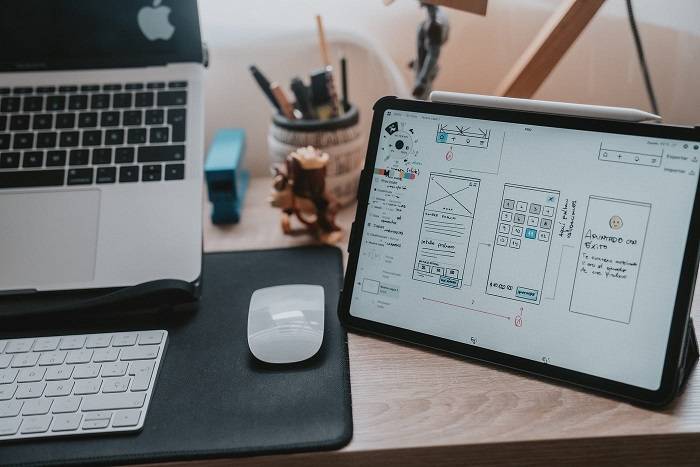
When considering audio enhancement apps, those with intuitive interfaces that cater to both beginners and professionals play a pivotal role in making the recording and editing process accessible and efficient. Striking a balance between user-friendly design and advanced functionalities, these apps empower a broad range of users to achieve high-quality audio results without a steep learning curve.
User-Friendly Design: Apps with intuitive interfaces prioritize a user-friendly design, featuring clear navigation, straightforward controls, and easily accessible menus. This design philosophy ensures that beginners can quickly grasp the basics of the app without feeling overwhelmed, while professionals appreciate the efficiency and simplicity of the interface.
Guided Tutorials and Help Resources: Recognizing the diverse skill levels of users, these apps often include guided tutorials and help resources. Beginners can benefit from step-by-step guides and tutorials that walk them through the app’s features, while professionals may refer to advanced documentation or support resources for more nuanced tasks.
Drag-and-Drop Functionality: To streamline the editing process, many user-friendly apps incorporate drag-and-drop functionality. This intuitive feature allows users to easily arrange and edit audio elements, making it simple for beginners to start creating content while providing professionals with a quick and efficient way to manage their projects.
Contextual Menus and Tooltips: Intuitive interfaces leverage contextual menus and tooltips to provide users with information about specific functions. Beginners benefit from on-screen explanations and prompts, while professionals appreciate the quick access to advanced settings without unnecessary clutter in the interface.
Responsive Touch Controls: For mobile apps, especially those on tablets or smartphones, responsive touch controls are essential for an intuitive experience. The interface should adapt seamlessly to touch gestures, making it easy for users to navigate, edit, and control various parameters with their fingertips.
Customizable Workspaces: To cater to the preferences of both beginners and professionals, some apps offer customizable workspaces. Beginners may opt for simplified layouts, while professionals can configure the interface to display the tools and features they use most frequently, enhancing workflow efficiency.
Visual Representation of Effects: Intuitive interfaces often include a visual representation of effects and adjustments applied to the audio. This graphical feedback aids both beginners and professionals in understanding how changes impact the audio, facilitating a more intuitive and responsive editing process.
Toggleable Advanced Features: To avoid overwhelming beginners with a plethora of options, some apps include toggleable advanced features. Users can choose to reveal or hide more complex functionalities, allowing them to gradually explore and adopt advanced tools as they become more proficient.
Compatibility with Touchscreens and Cross-Platform Use: Given the prevalence of touchscreen devices, especially in the case of tablets and 2-in-1 laptops, intuitive interfaces are optimized for touch controls. Additionally, apps designed for cross-platform use maintain a consistent and familiar interface across different devices, ensuring a seamless transition for users who switch between desktops, laptops, and tablets.
Regular Updates Based on User Feedback: A commitment to continuous improvement is a hallmark of apps with intuitive interfaces. Developers often release regular updates based on user feedback, addressing usability issues, introducing new features, and refining the interface to enhance the overall user experience.
Advanced Audio Editing Tools
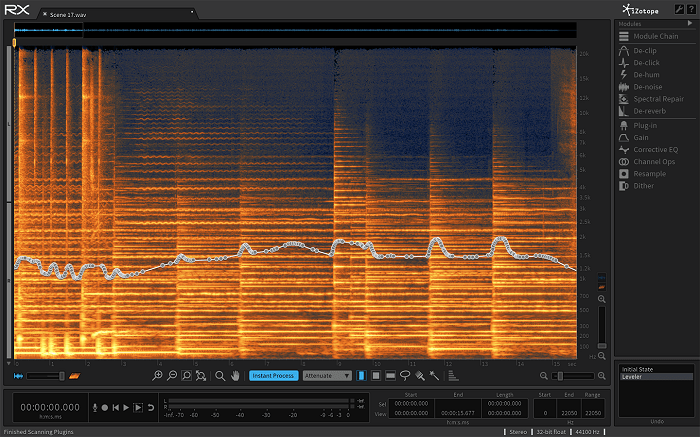
In the realm of audio enhancement apps, there’s a subset that caters to users seeking advanced editing tools for fine-tuning recordings, adding effects, and adjusting audio levels. These applications are designed for professionals, audio engineers, and enthusiasts who demand a comprehensive suite of features to shape and polish their audio content with precision.
Advanced Editing Tools: These apps distinguish themselves by offering a range of advanced editing tools that go beyond basic functionalities. Users can perform detailed edits, such as cutting and splicing audio clips, applying crossfades, and seamlessly arranging elements within the timeline. This level of granularity is essential for crafting polished and seamless audio productions.
Non-Destructive Editing: Many advanced apps feature non-destructive editing capabilities. This means that users can make changes to their audio files without permanently altering the original source. Non-destructive editing is crucial for experimentation and maintaining the integrity of the raw recording throughout the editing process.
Multi-Track Editing and Mixing: To accommodate complex audio projects, these apps support multi-track editing and mixing. Users can work with multiple audio tracks simultaneously, enabling the creation of intricate arrangements, layering of sounds, and the application of diverse effects to individual tracks for a nuanced final result.
Dynamic Range Processing: Advanced editing tools often include dynamic range processing features, such as compression and limiting. This allows users to control the volume dynamics of their recordings, ensuring consistent levels and preventing distortion or loss of detail in both quiet and loud sections.
Time-Stretching and Pitch-Shifting: For creative manipulation of audio elements, these apps provide time-stretching and pitch-shifting tools. Musicians and producers can alter the tempo or pitch of recordings without affecting the overall duration, opening up possibilities for experimentation and creative expression.
Spectral Editing: Some apps go a step further by incorporating spectral editing capabilities. This advanced feature allows users to visualize and manipulate the frequency content of audio, enabling precise control over individual frequencies and enhancing the overall spectral balance of the recording.
Advanced Equalization (EQ) and Filtering: To tailor the tonal characteristics of audio recordings, advanced EQ tools are a staple in these apps. Users can apply parametric or graphic equalization to shape the frequency response, effectively sculpting the sound to meet specific requirements or correct deficiencies in the original recording.
Comprehensive Effects Library: An extensive library of effects is a hallmark of these apps. From reverb and delay to modulation and specialized audio processors, users have access to a wide array of effects to add texture, depth, and character to their recordings. The ability to stack and customize these effects enhances the creative possibilities for audio professionals.
Automation and Envelopes: Automation and envelope features provide users with the ability to dynamically control various parameters over time. This includes automating volume changes, effect parameters, and other aspects of the audio. Automation allows for precise control and customization of the audio mix.
High-Quality Audio Restoration Tools: Recognizing the importance of clean recordings, these apps often come equipped with high-quality audio restoration tools. Users can remove unwanted noise, clicks, pops, and other imperfections, restoring recordings to a pristine state.
Mastering Tools: For those aiming for a polished final product, some advanced apps include mastering tools. These tools encompass final processing steps to ensure that the entire audio project is cohesive, balanced, and ready for distribution across various platforms.
Extensive Format Support and Export Options: To accommodate diverse workflows, these apps typically support a wide range of audio formats and provide various export options. Whether preparing content for streaming services, broadcasting, or archiving, users can choose the format that best suits their needs.
Wireless Connectivity Options

In the landscape of audio enhancement apps, a notable category stands out for its support of wireless connectivity, facilitating the seamless transfer of files between devices. These apps recognize the importance of flexibility and convenience in modern workflows, allowing users to effortlessly share, collaborate, and access their audio files across various platforms.
Wireless File Transfer Protocols: Apps with wireless connectivity often leverage standard file transfer protocols such as Wi-Fi, Bluetooth, or AirDrop (for Apple devices). This ensures compatibility with a wide range of devices, making it easy for users to transfer audio files between smartphones, tablets, computers, and other compatible devices.
Cross-Platform Compatibility: Recognizing the diversity of devices and operating systems, these apps prioritize cross-platform compatibility. Users can seamlessly transfer audio files between iOS and Android devices, as well as between different operating systems such as Windows, macOS, and Linux. This flexibility is essential for collaborative projects and workflows involving multiple devices.
Efficient Peer-to-Peer Transfer: To streamline the transfer process, many of these apps offer peer-to-peer transfer capabilities. Users can directly connect their devices, enabling faster and more efficient file transfers without the need for an intermediate server. This is particularly useful in scenarios where a quick exchange of files is essential.
Integration with Cloud Services: Some apps extend their wireless connectivity by integrating with popular cloud services. Users can seamlessly upload, download, and sync their audio files with cloud storage platforms like Google Drive, Dropbox, or iCloud. This integration ensures accessibility and backup options while leveraging the convenience of wireless transfers.
Near Field Communication (NFC) Support: For users seeking even more convenience, certain apps incorporate Near Field Communication (NFC) support. This technology allows for quick and effortless pairing of devices by simply bringing them close together. NFC is particularly handy for transferring files between compatible devices with a simple tap.
Secure File Transfer: Security is a priority for these apps, and they often implement encryption and secure transfer protocols to protect users’ files during wireless transfers. This ensures that sensitive audio content remains confidential and secure, especially when shared over public networks.
Batch Transfer and Bulk Operations: To enhance efficiency, apps supporting wireless connectivity typically offer batch transfer options. Users can select multiple audio files and transfer them in one go, minimizing the time and effort required for individual transfers. This is particularly useful for users managing large projects or extensive audio libraries.
Real-Time Progress Indicators: Providing real-time progress indicators during file transfers is a user-friendly feature of these apps. Users can easily monitor the status of their transfers, ensuring transparency and eliminating uncertainty about the completion of the process.
Integration with Native Operating System Features: Apps with wireless connectivity often integrate seamlessly with native operating system features. This includes leveraging Android’s Nearby Share, iOS’s AirDrop, or Windows’ Wi-Fi Direct. By utilizing built-in functionalities, these apps enhance the overall user experience and reduce the learning curve for file transfers.
Customizable Transfer Settings: Recognizing the diverse needs of users, these apps often include customizable transfer settings. Users can adjust parameters such as transfer speed, compression options, and destination folders, tailoring the file transfer process to suit their preferences and requirements.
Related Posts:
- Unveiling the Unspoken Disadvantages of Podcasts: A Comprehensive Analysis
- Unveiling the Transformative Power and Purpose of Podcasts in the Modern Era
- Mastering Latency Correction in Audacity: Troubleshooting Errors and Solutions
FAQs:
Can I use these apps with any Android device?
While most apps are compatible with various Android versions, it’s advisable to check specific app requirements on the Play Store to ensure compatibility with your device.
Do these apps support external microphones?
Yes, many of these apps support external microphones, providing enhanced audio recording capabilities.
Are these apps suitable for professional use?
Absolutely! Many of these apps offer professional-grade features and are widely used by musicians, podcasters, journalists, and content creators.
These Android microphone apps revolutionize the way we capture audio on our smartphones. Whether you’re a podcaster, musician, journalist, or content creator, the diverse range of functionalities offered by these apps caters to various recording needs. With the right app, your Android device becomes a powerhouse for high-quality audio recording and editing, amplifying your creative endeavors. Explore the options mentioned in this guide and unlock the true potential of your Android device for unparalleled sound recording experiences.