


Table of Contents
In the digital age, the iPhone has become an indispensable tool for music lovers and creators alike. With its powerful capabilities, it’s no surprise that the App Store is brimming with music recorder apps designed to turn your iPhone into a portable studio. Whether you’re a musician, a podcaster, or simply someone who enjoys capturing fleeting musical moments, the plethora of apps available can be overwhelming.
However, fear not! In this comprehensive guide, we’ll delve into the world of music recorder apps for the iPhone, exploring the top 10 options that stand out in 2023. From intuitive interfaces to high-quality audio recording features, these apps cater to various needs and skill levels, offering a range of functionalities to unleash your musical creativity.
GarageBand
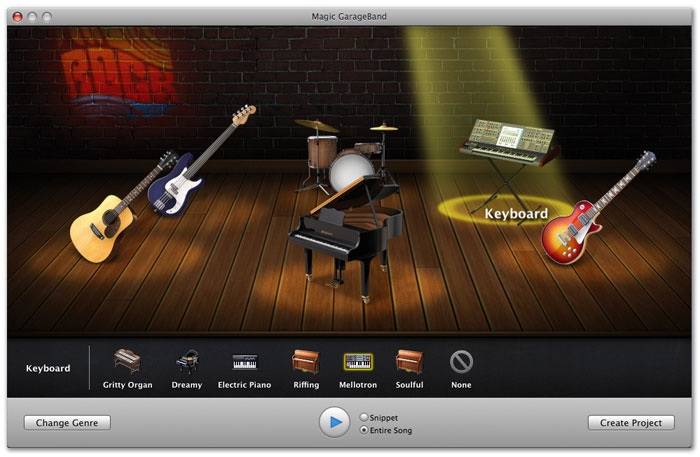
GarageBand, developed by Apple Inc., has solidified its position as an industry-leading music production software, catering to both seasoned musicians and beginners exploring the realm of music creation. Its popularity stems from its intuitive interface, offering a seamless experience for users to unleash their musical creativity.
One of GarageBand’s standout features is its extensive collection of virtual instruments, covering a diverse range from guitars, pianos, drums, and synthesizers to an array of sampled sounds. These instruments are meticulously crafted to provide authentic tones and realistic performances, empowering users to experiment with different sounds without the need for physical instruments.
Beyond its impressive instrument library, GarageBand incorporates powerful recording capabilities. Users can easily record multiple tracks, apply various effects and enhancements, and manipulate audio with precision. The software’s flexibility allows musicians to layer tracks, edit recordings, and fine-tune compositions, enabling the creation of professional-grade music productions directly on their Mac or iOS devices.
Moreover, GarageBand offers an array of pre-made loops and templates across different genres, allowing users to kickstart their projects or explore new musical directions effortlessly. This feature is particularly appealing to beginners seeking inspiration or those looking to create music quickly without delving into intricate music theory or composition.
Additionally, GarageBand seamlessly integrates with other Apple products and services, enabling users to leverage the ecosystem. Projects created on GarageBand can be easily transferred to Logic Pro X, Apple’s professional-grade digital audio workstation (DAW), for more advanced editing and production.
The software’s accessibility and depth make it a valuable tool for educational purposes, empowering students and educators to learn about music production, composition, and recording techniques in an engaging and user-friendly environment.
Voice Memos
Voice Memos, a native app pre-installed on iPhones, is an often-underestimated gem due to its simplicity and ease of use. This unassuming yet powerful tool serves as a versatile audio recording application, offering a range of functionalities that cater to various needs, from casual users to professionals seeking convenient recording options on the go.
The app’s straightforward interface makes it exceptionally user-friendly, allowing individuals to effortlessly capture audio recordings with just a few taps. Its primary purpose is to provide a quick and accessible means of recording anything from spontaneous song ideas, melodies, or lyrics that musicians wish to preserve to capturing important reminders, lectures, interviews, or even ambient sounds for sound design purposes.
Voice Memos’ simplicity is one of its greatest strengths, making it an accessible tool for anyone without prior experience in audio recording or editing. Users can start recording almost instantly, enabling them to focus on their ideas or the content being captured rather than navigating through complex settings or controls.
Despite its minimalistic appearance, Voice Memos offers practical features such as the ability to trim recordings, add titles, labels, or organize recordings into folders for better management. This functionality makes it more than just a basic recording app, allowing users to keep their recordings organized and easily accessible.
Additionally, Voice Memos synchronizes seamlessly with other Apple devices through iCloud, enabling users to access their recordings across various devices linked to the same Apple ID. This integration facilitates a smooth workflow, allowing users to record on their iPhone and access, edit, or share the recordings effortlessly on their Mac, iPad, or other Apple devices.
For musicians, Voice Memos serves as a quick and efficient tool for capturing musical snippets, melodies, or impromptu jam sessions. These recordings can later be imported into more advanced music production software like GarageBand or Logic Pro X for further refinement and expansion into full-fledged compositions.
Pro Tools First
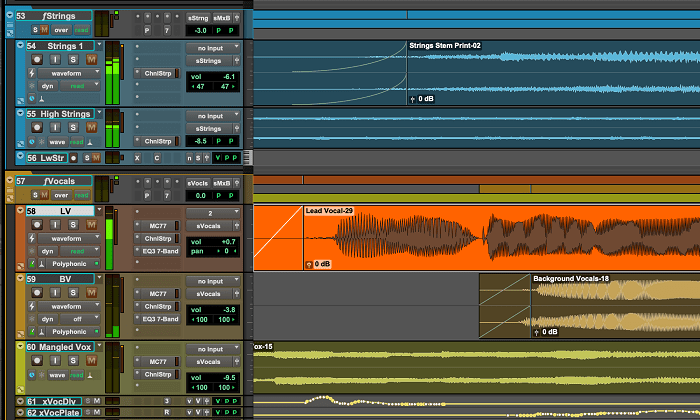
Pro Tools | First stands out as a powerful solution for individuals looking to achieve professional-grade recording capabilities directly on their iPhones. Developed by Avid, a prominent name in the audio industry, Pro Tools | First brings a robust set of features typically associated with professional audio workstations to the mobile platform.
One of its key advantages is the provision of advanced editing features that allow users to fine-tune their recordings with precision and detail. From precise audio editing tools like trimming, cutting, and crossfading to the ability to manipulate individual tracks, Pro Tools | First offers a comprehensive suite of editing functionalities.
Moreover, the app provides access to a range of high-quality plugins, enabling users to enhance their recordings with effects, virtual instruments, EQs, compressors, reverbs, and more. These plugins not only expand the creative possibilities but also contribute to achieving a polished and professional sound directly on the iPhone, eliminating the need for extensive post-production on other platforms.
Additionally, Pro Tools | First offers seamless compatibility with its desktop counterpart, Pro Tools, enabling users to transfer their projects between devices effortlessly. This interoperability allows for a smooth workflow where recordings made on the iPhone can be further refined, mixed, or mastered on a Mac or Windows computer running the full Pro Tools software.
The integration with the Pro Tools ecosystem ensures that users can start a project on their iPhone, continue working on it using Pro Tools | First on their desktop, and vice versa, maintaining consistency across platforms.
For musicians, producers, podcasters, or audio engineers seeking professional results while on the move, Pro Tools | First on the iPhone serves as a portable yet capable recording studio. Its ability to handle multitrack recording, sophisticated editing, and the utilization of plugins makes it a versatile tool for capturing high-quality audio in various environments.
The combination of Pro Tools | First’s mobile capabilities with its compatibility with the broader Pro Tools ecosystem positions it as a valuable asset for professionals and enthusiasts alike. It empowers users to create, edit, and produce audio content with the level of quality and precision expected from industry-standard recording software, all within the convenience of their iPhones.
Music Memos
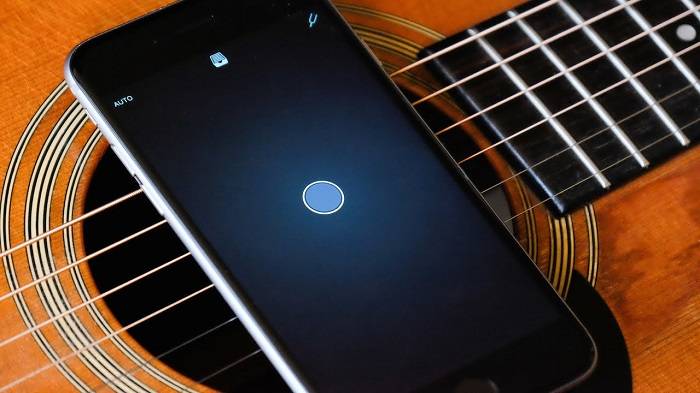
Music Memos, an innovative app designed by Apple, stands out as a valuable tool catered explicitly to musicians, offering a range of features that streamline the songwriting and composition process. Tailored to meet the needs of musicians on the go, Music Memos serves as a versatile and intuitive platform for capturing musical ideas and turning them into full-fledged compositions.
One of the standout features of Music Memos is its automatic accompaniment functionality. This feature allows musicians to record their musical ideas using just a guitar or piano and instantly generates a backing band to accompany the recorded snippet. By analyzing the rhythm and chords played, the app intelligently adds drums, bass, and other instruments, providing a simulated backing track that gives users a fuller picture of their musical ideas. This not only helps in fleshing out compositions but also aids in experimentation and inspiration, allowing musicians to explore different arrangements effortlessly.
Furthermore, Music Memos employs sophisticated algorithms to analyze rhythm and chord structures within recordings. This analysis feature provides valuable insights to musicians, displaying the detected chords and rhythmic patterns directly within the app. It helps musicians in accurately documenting their musical ideas and serves as a helpful reference for refining compositions or sharing musical concepts with bandmates or collaborators.
The app’s user-friendly interface and seamless integration with GarageBand and other music production software enhance its utility. Musicians can easily export their recorded ideas from Music Memos to GarageBand, where they can further refine, arrange, and produce their compositions using the extensive features offered by GarageBand’s more comprehensive environment.
Music Memos’ accessibility and functionality make it a powerful ally for musicians at various stages of their creative process. From capturing spontaneous melodies or song ideas to analyzing chord progressions and rhythms, the app serves as a reliable companion for musicians seeking a convenient way to document and develop their musical concepts.
Its ability to streamline the songwriting process, provide instant musical accompaniment, and offer analytical tools for chords and rhythms makes Music Memos a valuable asset in the arsenal of musicians, songwriters, and composers. By seamlessly integrating technology with the creative process, Apple’s Music Memos empowers musicians to transform their raw musical inspirations into fully-realized compositions with ease and efficiency.
Ferrite Recording Studio
Ferrite Recording Studio stands as a powerful and versatile application tailored specifically for podcasters, providing a comprehensive suite of features to facilitate professional podcast creation directly on iOS devices. Developed by Wooji Juice Ltd, Ferrite offers an array of tools and functionalities that cater to the specific needs of podcast producers, enabling them to craft high-quality audio content with ease and efficiency.
At the core of Ferrite’s appeal is its robust set of editing tools, allowing podcasters to perform intricate audio edits directly on their iPhones or iPads. The app provides a range of editing options, including precise waveform editing, trimming, cutting, fading, and the ability to apply various effects and enhancements to audio clips. This level of control empowers podcasters to polish their recordings, eliminate imperfections, and create a seamless final product without the need for extensive post-production on desktop software.
Furthermore, Ferrite supports multitrack recording, enabling users to simultaneously record multiple audio tracks and effortlessly arrange them within the app’s interface. This feature is particularly beneficial for podcasters conducting interviews, discussions, or incorporating multiple audio elements into their episodes. The ability to manage and edit multiple tracks within a single platform streamlines the production process and enhances workflow efficiency.
Seamless integration with cloud storage services is another standout feature of Ferrite. The app allows users to effortlessly import audio files from and export them to various cloud storage platforms such as iCloud, Dropbox, or Google Drive. This integration simplifies the management of podcast assets, enabling podcasters to access their recordings from different devices and collaborate with team members or co-hosts seamlessly.
Spire
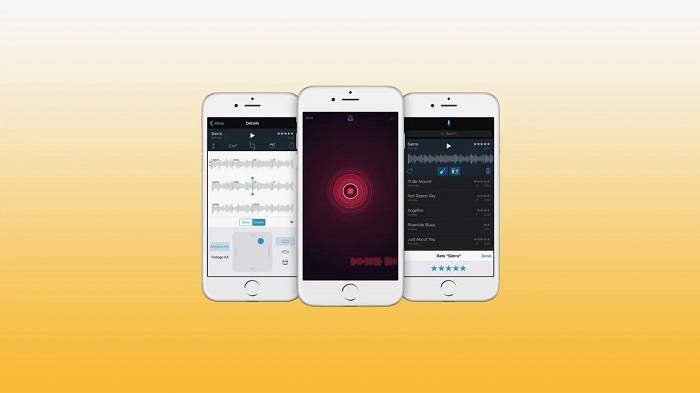
Spire by iZotope stands as a groundbreaking and user-friendly recording solution, offering innovative features that streamline the recording process and elevate the audio quality. Tailored for musicians, content creators, and podcasters, Spire redefines the mobile recording experience through its intuitive design and cutting-edge functionalities.
One of the standout features of Spire is its innovative Soundcheck technology, which revolutionizes the way recording levels are set. Soundcheck intelligently analyzes the incoming audio signal and automatically adjusts the recording levels to ensure optimal sound quality without the risk of clipping or distortion. This automated process eliminates the need for manual level adjustments, allowing users to focus entirely on their performance or content creation while Spire handles the technical aspects seamlessly. This feature not only simplifies the recording process but also guarantees consistent and professional-grade audio recordings.
The simplicity of Spire’s interface further contributes to its appeal. The app is designed to be user-friendly, featuring a straightforward layout that allows users to start recording with minimal setup. Its intuitive controls and navigation make it accessible to beginners while offering advanced functionalities appreciated by seasoned professionals. This balance between simplicity and sophistication enables users to capture high-quality audio effortlessly, whether they are musicians laying down tracks, content creators recording podcasts, or individuals capturing spontaneous ideas.
Moreover, Spire places a strong emphasis on sound quality. The app leverages iZotope’s renowned audio processing technology to ensure that recordings are captured with exceptional clarity, fidelity, and richness. This commitment to superior sound quality makes Spire a preferred choice among users who prioritize audio excellence in their recordings.
Another noteworthy aspect of Spire is its portability and versatility. The app can be seamlessly integrated with the Spire Studio hardware, a portable recording device that pairs with the app, providing additional hardware features such as built-in microphones, phantom power, and versatile input options. This integration expands the capabilities of Spire, catering to users looking for a complete and mobile recording solution for various audio recording scenarios.
n-Track Studio
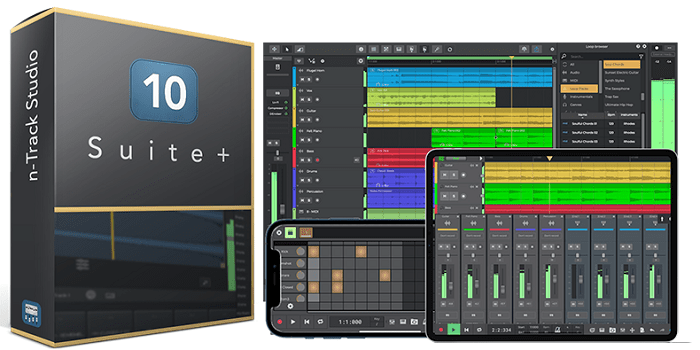
n-Track Studio stands as a robust and versatile mobile recording app that caters to a wide spectrum of recording needs, offering an extensive array of features that empower users to create professional-grade audio productions directly on their iOS devices. Designed for musicians, podcasters, and content creators, n-Track Studio provides a comprehensive set of tools for multitrack recording, MIDI support, and an impressive collection of effects and plugins.
At the heart of n-Track Studio lies its multitrack recording capabilities, allowing users to record and edit multiple audio tracks simultaneously. This feature is instrumental for musicians working on complex compositions, podcasters conducting interviews, or content creators incorporating various audio elements into their projects. The ability to manage and manipulate multiple tracks within a single platform streamlines the recording and editing process, offering enhanced flexibility and creative control.
In addition to its robust multitrack recording, n-Track Studio offers comprehensive MIDI support. Musicians can connect MIDI devices to their iOS devices and utilize n-Track Studio’s MIDI functionality to record, edit, and playback MIDI tracks. This capability enables the integration of virtual instruments, allowing users to access a vast range of sounds and create intricate musical arrangements directly within the app.
Furthermore, the app comes equipped with an extensive collection of effects and plugins, empowering users to enhance their recordings with professional-grade audio processing. n-Track Studio offers a variety of effects such as EQ, compression, reverb, delay, modulation effects, and more. Additionally, users can expand their sonic palette by incorporating third-party plugins and instruments into the app, further elevating the creative possibilities and allowing for a personalized recording environment.
The user-friendly interface of n-Track Studio makes it accessible to both beginners and experienced audio professionals. The intuitive layout and navigational controls simplify the recording and editing process, enabling users to focus on their creative endeavors without being encumbered by a steep learning curve.
Moreover, the app’s compatibility with external audio interfaces and hardware accessories ensures versatility and quality in recording, catering to users who seek enhanced audio input options and improved recording capabilities beyond the device’s built-in microphone.
Hokusai 2
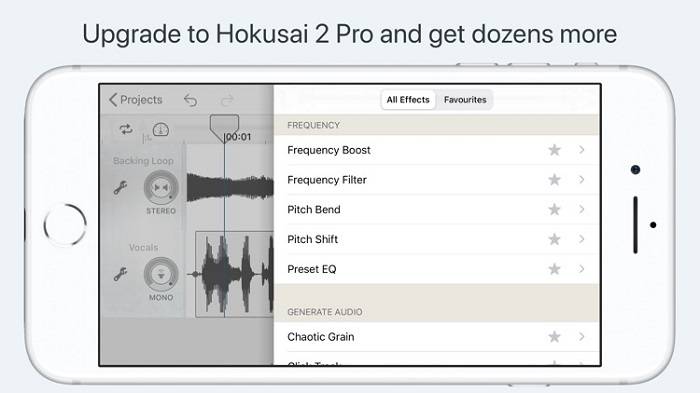
Hokusai 2 stands out as an exceptional audio editing application, renowned for its precision-focused editing tools and user-friendly interface. Tailored for users seeking meticulous control over their audio recordings, Hokusai 2 provides a comprehensive suite of editing features, allowing for detailed and precise manipulation of audio directly on iOS devices.
The app’s strength lies in its powerful editing capabilities, which cater to a wide range of users, from musicians and sound designers to podcasters and content creators. Hokusai 2 offers essential editing functions such as cut, copy, and paste, empowering users to manipulate audio segments effortlessly. This functionality is invaluable for tasks like rearranging audio clips, removing unwanted sections, or seamlessly merging different parts of recordings.
One of the standout features of Hokusai 2 is its provision of real-time effects, enabling users to apply effects and enhancements to audio recordings as they are being edited. This real-time processing capability allows for immediate auditioning of effects, including EQ, reverb, modulation effects, and more, facilitating on-the-fly adjustments and precise audio shaping during the editing process. Such functionality is especially valuable for musicians and sound designers who require immediate feedback while refining their audio compositions or soundscapes.
The app’s intuitive interface contributes significantly to its appeal. Hokusai 2 is designed to be user-friendly, featuring a clean and straightforward layout that enables users to navigate through editing tasks seamlessly. Its intuitive controls and responsive editing tools make it accessible to users of varying expertise levels, from novices to experienced audio professionals seeking precision in their editing workflows.
Furthermore, Hokusai 2 supports various audio file formats, ensuring compatibility with a wide range of audio sources. This versatility allows users to import, edit, and export audio files in different formats, offering flexibility when working with diverse audio content.
The portability of Hokusai 2, combined with its robust editing capabilities, makes it a practical tool for on-the-go audio editing tasks. Whether users are making final touches to music recordings, editing podcast episodes, creating sound effects, or refining voiceovers, Hokusai 2 provides the tools necessary for detailed and accurate audio editing directly from their iOS devices.
MultiTrack DAW
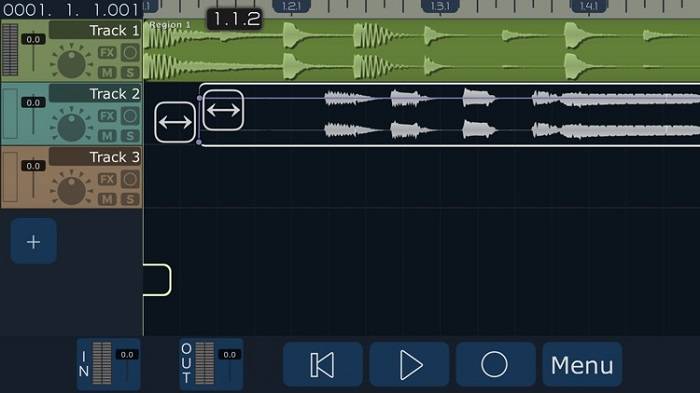
MultiTrack DAW stands out as a sophisticated and feature-rich digital audio workstation (DAW) tailored for advanced users and audio professionals seeking a comprehensive platform for music production, recording, mixing, and mastering on iOS devices. The app is designed to cater to the demands of seasoned musicians, sound engineers, producers, and anyone requiring a high-level DAW for complex audio projects.
At the core of MultiTrack DAW’s appeal is its ability to handle an unlimited number of audio tracks, providing ample room for users to create intricate and layered compositions without limitations. This feature is particularly advantageous for musicians and producers working on complex arrangements, enabling them to track multiple instruments, vocals, and audio sources simultaneously, accommodating projects of varying complexity.
Additionally, the app offers robust automation capabilities, allowing users to automate various parameters such as volume, panning, effects, and plugin settings across multiple tracks. Automation empowers users to create dynamic and nuanced audio productions by precisely controlling changes in audio elements over time. This level of control is essential for achieving professional-grade results and adding depth and expression to music compositions or audio projects.
MultiTrack DAW’s comprehensive mixing capabilities further enhance its appeal to advanced users. The app provides a versatile mixing environment with features like EQ, compression, reverb, delay, and other essential mixing tools. Users can manipulate audio with precision, balance tracks, fine-tune individual elements, and achieve a polished and cohesive final mix directly within the app.
Moreover, MultiTrack DAW’s compatibility with various audio interfaces and external hardware accessories offers advanced users the flexibility to integrate professional-grade recording equipment, enhancing the quality and versatility of their recordings. This compatibility ensures that users can utilize their preferred audio gear and instruments seamlessly within the app.
The app’s user interface is optimized for efficiency and flexibility, allowing users to navigate through complex projects, access editing tools, and manage tracks with ease. The intuitive design and responsive controls streamline the workflow for advanced users, empowering them to focus on creative aspects without being hindered by technical complexities.
Evermusic
Related Posts:
- WavePad vs. Audacity: Unveiling the Best Audio Editing Software
- Apple Podcast vs Overcast: Which Podcast App Reigns Supreme for Your Listening Experience
- Mastering Multi-Track Recording in GarageBand: A Comprehensive Guide
FAQs:
Can I record professional-quality music on an iPhone?
Absolutely! With apps like GarageBand, Pro Tools | First, and n-Track Studio, you can achieve professional-grade recordings on your iPhone.
Are these apps suitable for beginners?
Yes, many of these apps, such as GarageBand, Voice Memos, and Music Memos, are beginner-friendly and offer tutorials to get you started.
Do these apps support external microphones?
Yes, most of these apps support external microphones, enhancing audio quality and catering to different recording setups.
The iPhone serves as a versatile tool for music recording, and these top 10 apps cater to a wide range of users, from beginners to professionals. Whether you’re capturing song ideas, recording podcasts, or producing music, these apps offer the features and functionalities to unleash your creativity. Explore the options, experiment with different apps, and find the one that best suits your recording needs on your musical journey with your iPhone.