


Table of Contents
In the era of digital communication and content production, audio quality plays a crucial role. The demand for small wireless microphones, also known as lavalier microphones, has significantly increased due to their ability to provide both freedom of movement and exceptional sound quality. Whether you’re a filmmaker, presenter, public speaker, or content creator, a small wireless microphone can make all the difference in capturing clear and professional audio. In this comprehensive guide, we will explore the world of small wireless microphones, their variety, applications, setup, recording techniques, and valuable tips to help you elevate your sound quality to the next level.
Understanding Small Wireless Microphones
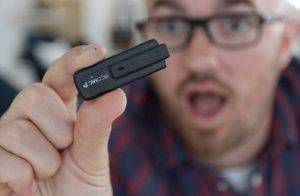
Before delving into the details, it’s essential to understand what small wireless microphones are and why they are essential in content production:
What Are Small Wireless Microphones?
- Small wireless microphones, also known as lavalier microphones, are compact devices designed to discreetly capture high-quality audio.
- They offer the freedom to move around without being tethered by cables, making them ideal for various applications.
Types of Small Wireless Microphones:
- Clip-On Lavalier Microphones: These miniature microphones can be easily attached to clothing, providing hands-free audio recording.
- Wireless Beltpack Systems: Small transmitters are often worn by the speaker, while the receiver connects to the recording device, ensuring wireless communication.
Applications of Small Wireless Microphones
Small wireless microphones are incredibly versatile and find use in a wide range of applications:
Filmmaking and Video Production:
- Filmmakers and videographers use small wireless microphones to capture clear and professional audio for interviews, documentaries, and cinematic projects.
Public Speaking and Presentations:
- Public speakers and presenters benefit from lavalier microphones, as they provide freedom of movement and ensure the audience can hear every word clearly.
Broadcast Journalism:
- Broadcast journalists rely on small wireless microphones to record audio for news segments and interviews, even in noisy environments.
Live Performances:
- Musicians and stage performers use lavalier microphones to amplify their voices or instruments during live shows, ensuring top-notch sound quality.
Content Creation:
- Content creators and YouTubers use small wireless microphones to enhance the audio quality of their videos, resulting in more engaging and professional content.
Setting Up Small Wireless Microphones

Proper setup is crucial to getting the most out of your small wireless microphone. Here’s how to set up and connect them effectively:
Lavalier Microphones:
- Attach the lavalier microphone to your clothing, ensuring it’s positioned close to your mouth for optimal audio capture.
- Connect the microphone’s cable to the wireless transmitter, which can be clipped to your belt or clothing.
Wireless Beltpack Systems:
- Attach the wireless transmitter, which includes a small microphone or an input for an external lavalier microphone, to the speaker’s clothing.
- Connect the receiver to your recording device, such as a camera or audio recorder, using the appropriate cables or adapters.
Channel Selection:
- Ensure that both the transmitter and receiver are set to the same frequency channel to establish a stable wireless connection.
Battery Check:
- Verify that the batteries in both the transmitter and receiver are fully charged or have enough power for the duration of your recording or performance.
Recording Techniques with Small Wireless Microphones
To achieve the best results with your small wireless microphone, consider these recording techniques:
Microphone Positioning:
- Experiment with the placement of the microphone to find the optimal position for capturing clear audio while minimizing background noise.
Wind Protection:
- Use windshields or foam covers to reduce wind noise when recording outdoors or in windy conditions.
Monitoring:
- Use headphones or a monitoring system to listen to the audio in real-time, ensuring that you capture the desired sound quality during recording.
Gain Control:
- Adjust the microphone’s gain or sensitivity settings to prevent audio distortion while maintaining a healthy audio signal.
Tips for Maximizing Small Wireless Microphone Performance
To ensure top-notch audio performance with your small wireless microphone, consider these valuable tips:
Noise Control:
- Choose recording locations with minimal background noise to achieve clean and clear audio recordings.
Battery Management:
- Carry spare batteries or ensure that your rechargeable batteries are fully charged to avoid interruptions during recording or performances.
Cable Management:
- Keep your microphone cables and connections organized and secure to prevent accidental tugging or interference.
Testing and Rehearsal:
- Before critical recordings or performances, conduct tests and rehearsals to familiarize yourself with the microphone’s behavior in different situations.
Troubleshooting Common Issues
Even with a high-quality small wireless microphone, occasional issues may arise. Here are some common troubleshooting steps:
Signal Interference:
- If you encounter signal interference, try switching to a different frequency channel to avoid conflicts with other wireless devices.
Battery Problems:
- Check and replace batteries in the transmitter and receiver if you experience sudden dropouts or audio inconsistencies.
Audio Distortion:
- Adjust microphone gain levels and input settings to eliminate audio distortion or clipping.
Range Limitations:
- Ensure that you are operating within the specified range of the small wireless microphone for optimal signal strength and audio quality.
Related Post:
Crafting Audio Excellence: A Comprehensive Guide to Vlogging Microphones for iPhone
Achieving Wireless Audio Excellence: A Comprehensive Guide to the SYNCO P1L Lavalier Microphone
Audio Excellence: A Comprehensive Guide to SYNCO Microphones
Small wireless microphones, or lavalier microphones, represent a remarkable advancement in audio technology, empowering professionals and content creators to capture exceptional sound quality while enjoying the freedom of movement. By understanding the various types of small wireless microphones, their applications, setup procedures, recording techniques, and following the tips and troubleshooting steps outlined in this comprehensive guide, you have the knowledge and tools to unlock the full potential of your small wireless microphone.
Whether you’re recording interviews, delivering presentations, creating captivating videos, performing live, or producing content, your choice of microphone will be a critical factor in the success of your audio. With superior sound quality and the convenience of wireless technology, you can confidently communicate, captivate, and create, leaving a lasting impression in the world of audio and content production.