


Table of Contents
In the age of mobile technology, smartphones like the iPhone have evolved into powerful tools for capturing not only stunning visuals but also high-quality audio. While built-in iPhone microphones have improved over the years, they may not always meet the demands of professional audio recording. This is where external microphones for iPhone come into play, opening up a world of possibilities for content creators, journalists, musicians, and anyone looking to elevate their audio game. In this comprehensive guide, we will dive into the realm of external microphones for iPhone, exploring their types, applications, compatibility, and tips to help you harness their full potential.
Understanding External Microphones for iPhone
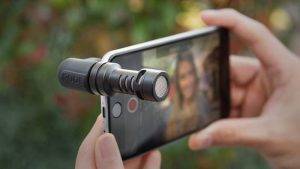
Before we delve into the details, let’s start by gaining a fundamental understanding of what external microphones for iPhone are:
What Are External Microphones for iPhone?
- External microphones for iPhone, often referred to as iPhone mics or iOS-compatible microphones, are specialized audio devices designed to connect to your iPhone via the Lightning port or the headphone jack (in older iPhone models).
- They offer superior audio quality, noise reduction, and versatility compared to the built-in iPhone microphone.
Types of External Microphones for iPhone:
- Lavalier Microphones: These are small, clip-on microphones that can be discreetly attached to clothing for hands-free recording.
- Shotgun Microphones: Shotgun mics are highly directional and ideal for capturing sound from specific directions, making them great for interviews and outdoor recording.
- Handheld Microphones: Handheld microphones, similar to those used by performers and presenters, are available in iPhone-compatible versions.
- Stereo Microphones: Some external microphones offer stereo recording, capturing a wider audio field for immersive soundscapes.
Applications of External Microphones for iPhone
External microphones for iPhone cater to a variety of creative and professional needs. Here are some common applications:
Vlogging and Content Creation:
- Vloggers and content creators can enhance the audio quality of their videos, ensuring clear voiceovers and reducing ambient noise.
Journalism and Interviews:
- Journalists can capture interviews and field reports with improved audio clarity, even in noisy environments.
Music Recording:
- Musicians can use iPhone-compatible microphones for recording instruments, vocals, and live performances with precision.
Podcasting:
- Podcasters can achieve broadcast-quality audio for their podcasts, ensuring that their voices are crisp and clear.
Outdoor Recording:
- External microphones for iPhone are great for capturing outdoor sounds, whether you’re recording nature, events, or on-location audio.
Compatibility and Connectivity
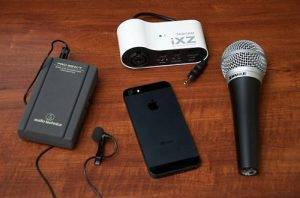
Ensuring compatibility and proper connectivity is key when choosing an external microphone for your iPhone:
Lightning Port Microphones:
- Most modern iPhones feature a Lightning port, making them compatible with Lightning-connected microphones. Simply plug and play.
Headphone Jack Microphones (Legacy Models):
- For older iPhone models with headphone jacks, you can use microphones with a 3.5mm TRRS (Tip, Ring, Ring, Sleeve) connector.
Adapter Compatibility:
- If your iPhone lacks a headphone jack, you may need a Lightning to 3.5mm adapter to use traditional 3.5mm microphones.
iOS Compatibility:
- Ensure that the microphone you choose is compatible with your iPhone’s operating system. Most reputable brands provide iOS compatibility information.
Tips for Maximizing External Microphone Performance
To get the most out of your external microphone for iPhone, consider these performance-enhancing tips:
Invest in a Windshield or Pop Filter:
- Windshields and pop filters help reduce wind noise and plosive sounds when recording outdoors or in close proximity to the microphone.
Use a Stable Mount:
- Mount your iPhone and microphone on a stable tripod or rig to minimize handling noise and vibrations.
Monitor Audio Levels:
- Utilize audio monitoring apps or accessories to keep an eye on audio levels and ensure your recordings are not distorted or too quiet.
Experiment with Mic Placement:
- Adjust the placement of your external microphone to achieve the desired audio capture, whether it’s for voiceovers, interviews, or music recording.
Troubleshooting Common Issues
Even with the best equipment, issues may arise. Here are some common troubleshooting steps:
Check Cable Connections:
- Ensure that all cable connections are secure, including the connection between the microphone and your iPhone.
Restart Your iPhone:
- A simple restart of your iPhone can resolve minor connectivity issues or software glitches.
Update Microphone Firmware:
- Check if there are any firmware updates available for your microphone to address compatibility or performance issues.
Test with Different Apps:
- Try recording with different recording apps to determine if the issue is specific to one app.
Top External Microphones for iPhone
To help you kickstart your journey into the world of external microphones for iPhone, here are some top options to consider:
Rode VideoMic Me-L:
- A directional shotgun microphone designed for iPhone videography with Lightning connectivity.
Shure MV88+ Video Kit:
- A versatile kit that includes a stereo condenser microphone, smartphone clamp, and tripod, offering high-quality audio recording for a variety of applications.
Sennheiser Ambeo Smart Headset:
- A unique combination of in-ear headphones and binaural microphone for immersive audio capture.
Audio-Technica ATR-3350xiS:
- An affordable lavalier microphone with a 3.5mm TRRS connector for interviews and on-the-go recording.
Related Post:
The Magic of Movie Microphones: A Comprehensive Guide
Boom Microphones in Film: Capturing Cinematic Sound
The Sound of Excellence: Unleashing the Power of the Best Phone Microphones
External microphones for iPhone have redefined the possibilities of mobile audio recording and content creation. Whether you’re a vlogger, journalist, musician, or simply someone who values high-quality audio, these microphones can elevate your work to new heights.
By understanding their types, applications, compatibility, and following the tips mentioned in this comprehensive guide, you have the tools to unlock the full potential of external microphones for iPhone. With improved audio quality and versatility at your fingertips, you can capture and create content that not only looks great but sounds exceptional, leaving a lasting impression on your audience.