

Table of Contents
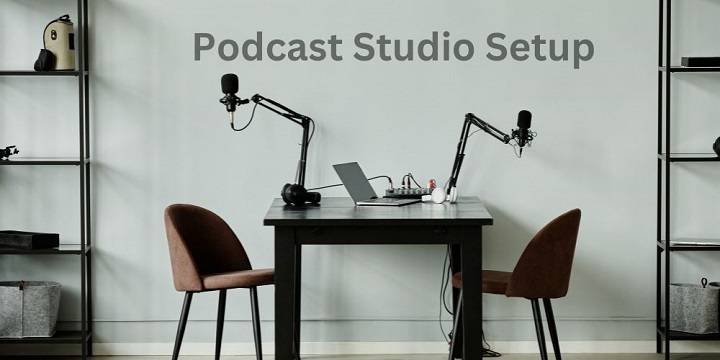
Starting a podcast is an exciting venture, and one of the most critical aspects of podcasting is your recording environment. A well-thought-out podcast setup can significantly impact the quality of your content and the overall experience for your listeners. In this blog post, we will explore a range of podcast setup ideas to help you create a comfortable, professional, and efficient recording space for your podcasting journey.
Location, Location, Location

Dedicated Home Studio:
If you have space and budget, consider setting up a dedicated home studio for your podcast. This allows you to have full control over your recording environment and minimize external noise.
Quiet Room or Closet:
Choose a quiet room or even a closet as your recording space. Closets, with their soft, absorbent materials, can be surprisingly effective at reducing background noise.
Acoustic Treatment:
Invest in acoustic treatment to improve sound quality. Options include foam panels, bass traps, and diffusers, which can help reduce echo and reverb.
Microphones and Headphones
Dynamic Microphone:
Consider using a dynamic microphone for its excellent noise rejection and durability. Popular options include the Shure SM7B and the Electro-Voice RE20.
Condenser Microphone:
Condenser microphones are known for their sensitivity and clarity. They work well in controlled environments and are often used for studio recording. The Audio-Technica AT2020 and the Rode NT1-A are popular choices.
Quality Headphones:
Invest in a pair of closed-back headphones to monitor your audio while recording. Closed-back headphones help isolate your voice and reduce bleed from other sources.
Mixers and Audio Interfaces

Audio Mixer:
An audio mixer allows you to control audio levels, add effects, and manage multiple microphones if you have guests. Consider mixers like the Behringer Xenyx Q802USB or the Mackie ProFX12v3.
USB Audio Interface:
If you’re using a computer for recording, a USB audio interface can provide high-quality analog-to-digital conversion. Options like the Focusrite Scarlett 2i2 and the PreSonus AudioBox USB are popular choices.
Recording and Editing Software
Audacity:
Audacity is a free, open-source audio editing software suitable for both beginners and experienced podcasters. It offers a range of editing tools and effects.
Adobe Audition:
Adobe Audition is a professional-grade audio editing software that provides advanced features for podcast production. It offers noise reduction, multi-track editing, and more.
GarageBand:
GarageBand is an Apple-exclusive software that’s user-friendly and ideal for Mac users. It offers podcast templates and built-in virtual instruments.
Soundproofing and Acoustics
Use Acoustic Panels:
Install acoustic panels on your walls to reduce echo and improve sound quality. These panels come in various shapes, sizes, and colors to fit your studio’s aesthetics.
Soundproof Curtains:
Heavy, soundproof curtains can help block external noise from entering your recording space. They also add a touch of style to your setup.
Floor Rugs:
Placing rugs or carpets on the floor can help absorb sound and prevent it from bouncing off hard surfaces.
Furniture and Comfort

Ergonomic Chair:
Invest in a comfortable, ergonomic chair. You’ll be spending hours recording and editing, so your comfort matters.
Podcast Desk:
A dedicated podcast desk can help you keep your equipment organized and create an efficient workspace.
Adjustable Microphone Arm:
Consider a microphone arm that can be adjusted to your preferred height and angle for maximum convenience during recording.
Lighting
Natural Light:
If possible, position your setup near a window to take advantage of natural light. It not only improves your video quality but also enhances your mood.
LED Lights:
Consider using LED lights to set the right mood for your podcast. Adjustable LED panels can help you achieve the perfect lighting conditions.
Ring Light:
A ring light is an excellent addition if you’re recording video as well. It provides even lighting and reduces shadows on your face.
Cable Management
Cable Clips:
Use cable clips or organizers to keep your cables neat and prevent them from tangling.
Velcro Straps:
Velcro straps are great for bundling and securing longer cables to avoid tripping hazards.
Personal Touch
Decorate Your Space:
Add personal touches to your recording space to make it uniquely yours. It can be artwork, posters, or items that reflect your podcast’s theme.
Branding:
Consider incorporating your podcast’s branding into your setup. This could include branded merchandise, banners, or backdrops.
Test and Optimize
Sound Check:
Before recording, always perform a sound check to ensure your audio levels are balanced and clear.
Monitor and Adjust:
While recording, monitor your audio for any issues and make adjustments as needed.
Evaluate and Improve:
Periodically evaluate your setup and make improvements based on your evolving needs and listener feedback.
Related Posts:
- Mastering Your Streaming Microphone Setup: A Comprehensive Guide
- Exploring the Podcast Universe: A Guide to Different Types of Podcasts
- Exploring the Best Jordan Peterson Podcast Episodes: Insights and Inspiration
Creating the perfect podcast setup is a combination of thoughtful planning, quality equipment, and personal touches. Your recording environment plays a significant role in the success of your podcast, impacting both the audio and visual quality. By considering the ideas and tips presented in this guide, you can design a podcasting space that not only enhances the quality of your content but also inspires creativity and professionalism. Whether you’re just starting or looking to upgrade your setup, the journey to creating your ideal podcast studio is both exciting and rewarding. Happy podcasting!